
Top MP4 to SRT Converter Online for Quick Subtitles

Installing a dedicated video editor to extract subtitles from an MP4 file wastes time and disk space. When you need a quick caption file for a single upload, running the task inside your web browser is much simpler. A reliable online MP4-to-SRT converter turns video speech into structured timecodes without requiring local software installation.
The main issue with web-based converters is that processing limits rarely show up until mid-upload. Unexpected file size caps, forced registration, and missing text editors can easily disrupt your publishing workflow. We evaluated five popular browser tools based on free quotas, file caps, link support, and subtitle editing to show what works for real projects.
Comparison of the Best Online MP4 to SRT Tools
Short social videos are usually easy to process, but longer podcasts, interviews, and webinars can quickly reveal the limits of online subtitle tools. This comparison evaluates each MP4-to-SRT converter online based on file handling, editing flexibility, language support, and overall workflow efficiency.
|
Tool |
Hoocs AI |
AudioScribe |
Any2Text |
FlexClip |
Zamzar |
|
Sign‑Up |
Required |
No for basic use |
No |
Required |
No for basic |
|
Free Access |
300 free minutes (15‑day validity) |
Free conversion for short videos |
First 15 minutes free |
Free plan available with usage limits |
Free conversions with size limits |
|
File Support |
Up to 10GB per file; supports 23 import/export formats |
Up to 5‑minute MP4 files |
No published file size limit |
Common video formats supported in editor |
Up to 50MB on free conversions |
|
Language Support |
130+ languages |
Multiple languages |
55+ languages |
140+ languages |
Not specified |
|
Online Link Input |
Yes |
No |
Yes |
Upload‑based |
Yes |
|
Speaker Recognition |
Yes |
Yes |
Yes |
Not a core feature |
No |
|
Subtitle Editing |
Browser‑based subtitle editing before SRT export |
Transcript review before export |
Subtitle line and speaker settings |
Visual subtitle timeline editor |
No dedicated subtitle editor |
|
Best For |
Best Overall |
Quick subtitle generation |
Simple online subtitle creation |
Video editing with captions |
Basic file conversion |
Hoocs AI offers the most balanced setup in this comparison, combining a 300-minute free trial, 10GB file support, URL link imports, multi-speaker detection, and an interactive in-browser editor.
Why Hoocs AI Fits Online MP4 to SRT Workflows
Browser tools promise quick results, but missing features usually push you back to desktop editors. Low upload limits and raw text exports force you to compress videos or fix typos in separate text files. Hoocs AI solves this friction by consolidating file ingestion, speech recognition, and line-by-line subtitle editing in a browser tab, giving creators a complete workspace without software installation.
Supporting up to 10GB file uploads and direct URL link parsing removes the biggest bottlenecks in browser transcription. You can convert mp4 to SRT online without pre-compressing heavy footage or downloading cloud assets to your local drive first. For marketing teams and video editors managing long-form interviews, this direct pipeline turns heavy media processing into a lightweight web task.
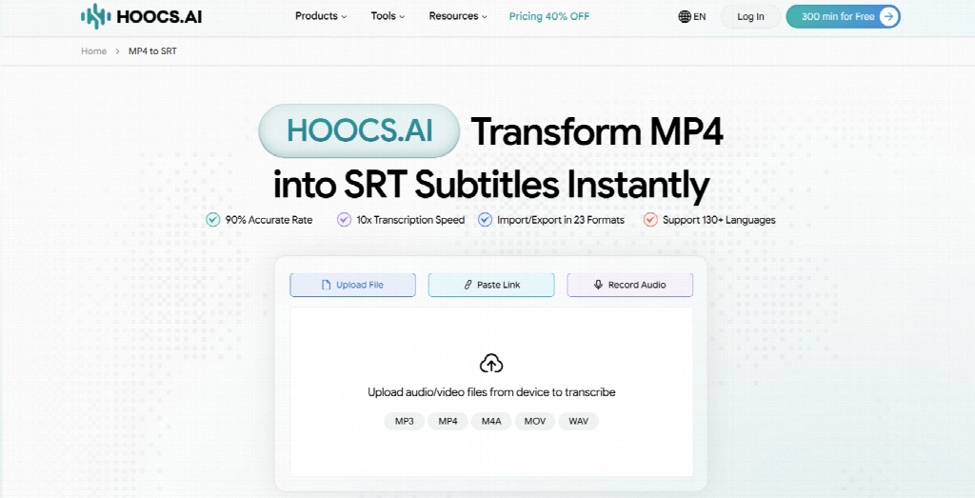
Upload Files or Paste Video Links
The platform accepts local MP4 files and public URL links to eliminate unnecessary downloads. You can convert mp4 to SRT online for free by pasting media links from cloud platforms directly into the dashboard. This flexibility saves valuable local disk space and bandwidth for remote content teams.
Process Heavy Video Files in Your Browser
Hoocs AI handles large video uploads up to 10GB per file across formats such as MP4, MOV, and AVI. With a 30-minute single-file duration cap on free plans and 5 hours per file on Pro, creators can transcribe full Zoom meetings and online classes directly without splitting files first.
Generate Timed Subtitles for Multi-Speaker Videos
The system automatically aligns timecodes and separates distinct voices across podcasts and panel discussions. By identifying individual speakers, the engine keeps multi-person dialogue structured. This helps video editors maintain accurate subtitle timing and clean line breaks without tagging speakers by hand.
Export Standalone SRT Files Ready for Publishing
The engine formats instantly processed transcripts into standard SRT files. You can download clean captions and import them straight into CapCut, Premiere Pro, or YouTube Studio. This direct export makes Hoocs AI a practical online MP4-to-SRT converter free of extra formatting steps.
Get 300 Free Minutes for Online Testing
Hoocs AI provides 300 free transcription minutes upon account setup, valid for 15 days. This allowance lets you test real video projects without hitting immediate payment walls. You can evaluate subtitle accuracy and export clean SRT files before committing to a paid subscription plan.
How to Convert MP4 to SRT Online with Hoocs AI
Generating a time-coded SRT file takes less than two minutes inside the browser workspace. Follow these five steps to process your video and download clean subtitles with Hoocs AI.
Step 1: Log In or Create Your Account. Sign in to the Hoocs AI dashboard or register a new account. New users receive 300 free transcription minutes to test the service on real video projects.
Step 2: Add Your MP4 File or Video Link. Drag your MP4 video file directly into the upload area. If your media is hosted online, paste a link from a major hosting platform, such as YouTube, Dropbox, or Google Drive, without downloading large files to your hard drive.
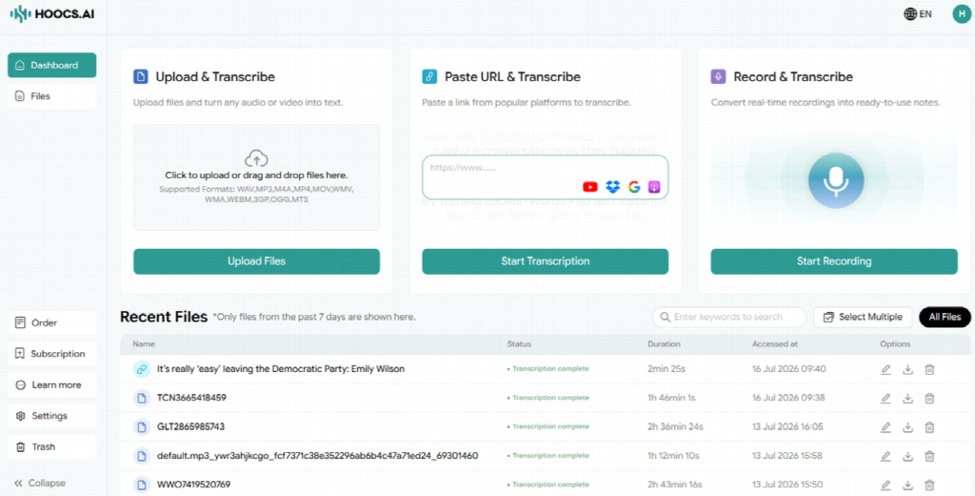
Step 3: Configure Language and Speaker Options. Select the primary spoken language of your video from the dropdown menu. Enable Speaker Recognition if your MP4 features dialogue between multiple speakers, then click Start Transcription.
Step 4: Review and Refine the Subtitles. Use the interactive editor to play the video preview alongside the transcript text. Correct proper nouns and technical terms, and review automated AI insights like text summaries or discussion points if needed.
Step 5: Export Your Finished SRT Subtitles. Click Download in the top right, select Subtitle File (.srt), and save the file to your computer. You can now upload the .srt file directly to YouTube or import it into your video editor to attach captions.
FAQs About Free Online MP4 to SRT Conversion
Can I convert MP4 to SRT online for free?
Yes, though free allowances vary between mp4-to-SRT converters. Lightweight tools like AudioScribe offer 5 free minutes without account registration. Hoocs AI provides 300 free transcription minutes valid for 15 days, allowing you to test real projects and export clean SRT files.
Do I need to install software to generate SRT files?
No. Browser converters run entirely inside web browsers such as Chrome, Safari, and Edge. You do not need to download desktop applications, install third-party plugins, or configure local hardware dependencies to process captions.
Can I edit subtitles before downloading the SRT file?
Editing features depend on the specific tool. Basic converters only provide a direct download link, while platforms like Hoocs AI include a browser editor so you can fix typos, adjust line breaks, and check speaker names before exporting.
Are online MP4-to-SRT converters safe for private videos?
Security practices vary by provider. Before uploading private footage, check whether the service uses encrypted connections, how long uploaded files are retained, and whether users can request automated data deletion.
Final Verdict
Choosing an mp4-to-SRT converter online is less about finding a generic file converter and more about finding a transcription workflow that fits the source video. Short clips may work well with lightweight, no-sign-up tools, while long interviews, webinars, and multi-speaker recordings usually require larger upload limits, editable transcripts, and reliable SRT export.
Hoocs AI delivers a practical browser workspace for creators and marketers handling everyday media files. Combining 300 free trial minutes with 10GB capacity, direct link imports, and in-browser editing, the platform simplifies captioning for vlogs, online tutorials, and webinars. Importing ready-to-use SRT files straight into your video publisher keeps your workflow moving efficiently.