
Top Platforms for Online Courses in 2027: 9 LMS Solutions Compared for ROI

AI-powered learning tools flooded the market in 2026. Yet Gartner reports that 85 percent of learning leaders expect a surge in skills-development needs during the next three years. Drawing on pricing pages, investor decks, and hundreds of user reviews collected through 13 October 2026, we asked a single 2027 question: Which online-course platform pays for itself once subscription fees, implementation, admin labour, and switching risk are tallied?
To find out, we modelled three common roll-outs—50, 500, and 5 000 learners—and surfaced nine finalists you can map to your own goals.
Marketplace, course platform, or LMS? Pick the right lane first
Before you compare features or price, confirm which type of product you are buying. The Learning Guild points out that every learning management system (LMS) is an online learning platform, yet many platforms are not LMSs at all.
Think of three traffic lanes:
Marketplace. According to Axios, after Coursera and Udemy completed their merger on 11 May 2026, the combined marketplace controls the storefront, the audience, and the rules. You upload courses and pay commissions.
Course-commerce platform. You get a branded shopfront and built-in payments along with ownership of pricing and customer data, but you still rely on the vendor’s infrastructure.
Learning management system. An LMS focuses on secure delivery, governance, reporting, and integration with the rest of your tech stack. It is about proving skills, not making sales.
Lane choice matters because costs, integrations, and exit risks differ sharply. Comparing a marketplace fee with an enterprise LMS subscription is like comparing rent with a mortgage: the obligations follow different clocks.
If you are weighing marketplace alternatives, GoSkills’ guide “9 Best Udemy Alternatives & Competitors in 2026” offers a creator-focused primer; this guide instead asks which lane delivers the strongest operational return in 2027.
The best online course platforms for 2027 at a glance
Now that the lanes are clear, here are the leading options.
We evaluated dozens of products against seven weighted criteria and surfaced nine that excel in at least one buyer archetype. The snapshot below lets you compare key economics and risks before you dive into detailed profiles.
|
Platform |
Best for |
Starting price* |
Main ROI lever |
AI focus |
Commerce / external training |
SSO & integrations |
Biggest watch-out |
|
GoSkills |
Internal-training SMBs |
$9.71 user/mo (annual) |
Bundled content + LMS |
Guided authoring |
Limited |
Zapier + native apps |
Fewer enterprise controls |
|
TalentLMS |
Straightforward SMB LMS |
$119/mo tier |
Branching at low TCO |
Content suggestions |
Optional store |
SSO, SCIM, API |
Price jumps at user bands |
|
LearnWorlds |
Commercial academies |
$24/mo (annual) |
Interactive-video upsell |
Adaptive video |
Strong |
Stripe + Zapier |
Transaction fees on low tiers |
|
Thinkific |
Course-commerce businesses |
$36/mo (annual) |
Built-in checkout |
Quiz generator |
Solid |
Native + REST API |
SCORM and analytics gated |
|
360Learning |
Collaborative enterprise learning |
$8 user/mo (Team tier) |
SME-led authoring speed |
Contextual AI |
Weak |
SSO, HRIS, CRM |
Less focus on selling courses |
|
Docebo |
Global multi-audience programs |
Custom quote |
Automation at scale |
Personalised paths |
Add-on module |
Deep SSO, SCIM, APIs |
High implementation cost |
|
Absorb LMS |
Enterprise admin & customer ed |
Custom quote |
External portals |
AI search |
Add-on |
SSO, REST, webhooks |
Opaque add-on pricing |
|
Moodle Workplace |
Control & custom workflows |
Partner quote |
Open ecosystem |
Plugin marketplace |
Varies |
Unlimited via plugins |
DIY hosting overhead |
|
Sana Learn |
AI-native enterprise pilots |
Custom quote |
AI discovery & creation |
Native LLM layer |
Developing |
Modern GraphQL API |
Smaller proof base |
*Published entry pricing captured 13 October 2026; verify with vendors before purchase. Source: OpsMatters primary price-page archive.
Price is only chapter one of total cost. Add-ons, admin time, and migration work often outweigh the entry fee. The next section breaks down those numbers.
Ready to see how the scoring model works? Jump to the methodology that powers this shortlist.
How we evaluated the nine platforms
Below is the scoring rubric we applied before publishing the results. We asked one question: Does each platform deliver more verified learning per dollar over a three-year contract than its peers? The model weights seven factors by economic impact:
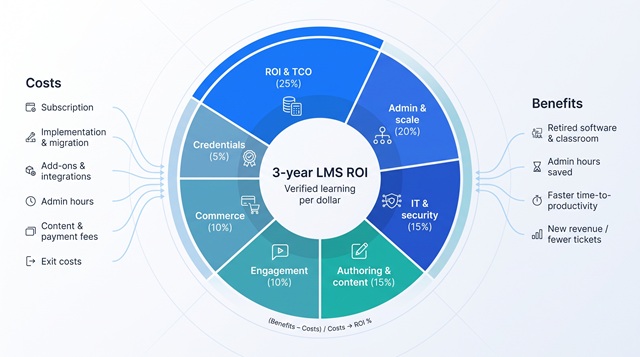
- ROI and total cost of ownership (25 percent). Subscription fees, implementation, add-ons, admin labour, and any tools you can retire once the LMS is live.
- Administration and scale (20 percent). Branches, roles, automation, and analytics that let you grow without hiring more staff.
- IT, security and integrations (15 percent). SSO, SCIM, APIs, audit trails, and data residency.
- Authoring and content supply (15 percent). Native creation tools, AI assistance, and standards support that prevent lock-in.
- Learner engagement (10 percent). Personalisation, mobile access, and community features that move users past the halfway mark.
- Commerce and external training (10 percent). Checkout flows, tax handling, and branded portals for revenue or customer success.
- Credentials and outcomes (5 percent). Certificates, expiry rules, and evidence of skills gained.
We scored evidence in this order: official documentation; Gartner, Forrester, and major directories; hands-on publisher tests; practitioner videos; then social-media threads. A Reddit anecdote hinted at pain points, but a published SLA outweighed it.¹
We also grouped tools by buyer archetype instead of ranking them 1 through 9, echoing the Learning Guild’s reminder that every LMS is an online learning platform, yet not every platform is an LMS.
Calculating real LMS ROI
Price pages show tidy monthly numbers, but real budgets tell a different story. Over a typical three-year contract, six cost buckets drive total cost of ownership:
- Subscription fees
- Implementation and migration
- Add-ons and integrations
- Administrator hours
- Paid content libraries and payment-processing fees
- Exit costs (exports, rewrites, penalties)
Benefits fall into four lines:
- Retired software and classroom spend
- Administrator hours saved through automation
- Faster employee time-to-productivity
- New revenue or support tickets avoided
We keep the math simple:
(Total benefits – Total costs) ÷ Total costs × 100 = ROI %
Running the equation for 50, 500, and 5 000-learner scenarios often shows that bargain list prices become costly once labour and add-ons hit the ledger.
What will matter most when choosing a platform for 2027
Governed AI, not generic text generation
Most vendors now show an “AI” button, but real value comes only when the model follows your policies and humans review outputs. Prioritise tools that:
- Let you select data sources and restrict what the model can read.
- Log every prompt and response with role-based permissions.
- Offer exportable audit trails, a must when regulators ask who wrote a safety script.
Ask whether your content trains the vendor’s foundation model. Data-isolation clauses differ and can shift compliance risk from low to critical in a single line.
Skills and business outcomes beat completion rates
Slide-deck completion stats impress no one. Look for platforms that tag lessons to defined skills, pull KPI data from your CRM or HRIS, and show whether certified reps sell more or incidents fall after retraining. Demand a live demo of pre-/post-assessments and manager sign-off; without that loop you will be exporting CSVs every Sunday night.
Portability under consolidation pressure
EdTech funding fell to just $2.4 billion in 2024, the lowest in a decade, prompting a wave of mergers and acquisitions. When Coursera and Udemy merged on 11 May 2026, instructors checked export paths the same day. Protect yourself now: insist on SCORM, xAPI or cmi5 exports, raw learner records, and contract clauses that guarantee access during any sunset period.
Cohorts, community, and blended learning lift engagement
Self-paced video works for quick “how-tos,” but longer programmes thrive on human connection. Test how many clicks it takes to enter a live session and how fast recordings land in the learner dashboard. If forums hide two menus deep, assume they will stay quiet in production.
Credentials and recertification keep compliance airtight
Regulators care less about a PDF certificate than about timely renewal. Your shortlist should automate expiry dates, reminders to learners and managers, and, when needed, access locks for lapsed credentials. Extra credit if the badge meets the Open Badges standard and can flow into LinkedIn or your HRIS.
GoSkills: best integrated value for SMB skills training
GoSkills combines an LMS, a drag-and-drop course builder, and an off-the-shelf skills library in one dashboard, so small teams avoid stitching three tools together before launch.
GoSkills LMS and skills library interface screenshot for SMB training
The LMS Pro plan lists $9.71 per user per month on an annual contract, and a forever-free tier lets you test workflows with real learners.
Why it wins for SMBs
- Fast time to value. Admins report publishing a first course in under two hours on GoSkills’ own case-study pages.
- Custom certificates. Branding stays front-and-centre during audits.
- Built-in library. Hundreds of bite-sized courses—including new additions from a recent Madecraft collaboration—in Excel, project management, and soft skills cut external content spend.
Trade-offs to note
GoSkills omits enterprise extras such as SCIM, multi-tenant portals, and advanced e-commerce. Choose it when speed, simplicity, and predictable pricing outrank deep governance. Pass if your security checklist spans 40 items or you must invoice thousands of customers this quarter.
TalentLMS: best for a straightforward SMB LMS rollout
TalentLMS gives small teams SCORM support, clear dashboards, and branch management, so trainers can wall off clients or departments without outside help.
Paid plans start at $119 per month for up to 40 registered users, and a Flex option bills only monthly active users, smoothing costs for seasonal businesses. SSO and most integrations live on higher tiers, so confirm plan details before signing.
What works
- Fast first import. Users on G2 report uploading a SCORM course in about five minutes.
- Mobile-native UX. The iOS and Android apps hold a 4.7-star average, which helps lift completions over desktop-only LMS averages.
- Built-in certificates and quiz engine cover basic compliance out of the box.
Limits
Reporting satisfies routine audits but stops short of ROI dashboards, and commerce offers fewer tax or subscription options than LearnWorlds or Thinkific.
Choose TalentLMS when you need a dependable, quick-to-launch LMS that will not intimidate non-technical trainers. Skip it if you serve thousands of paying customers or require SCIM, advanced automation, or detailed tax handling.
LearnWorlds: best for interactive commercial academies
LearnWorlds serves professional course sellers. Its Interactive Video Editor lets creators add quizzes, captions, and clickable paths, then surface drop-off analytics to fix weak spots. A drag-and-drop site builder brands the academy as your own, and built-in funnels capture leads without extra code.
Entry pricing starts at $24 per month when paid annually on the Starter plan, but that tier also charges a $5 per enrolment fee and limits monthly active learners. Branded mobile apps and additional assessments live on higher plans, so model growth before committing.
Where it excels
- Polished learner experience rivals custom builds.
- Commerce handles one-off sales, bundles, subscriptions, and EU VAT without extra add-ons.
- Video analytics flag drop-off points so you can patch content quickly.
Watch-outs
Admin roles and bulk actions trail enterprise LMS rivals, and SCORM import offers less flexibility than Docebo or Moodle. Support SLAs vary by plan, a critical detail if launches drive real-time sales.
Choose LearnWorlds when revenue depends on a sleek, branded academy with interactive video. Skip it if you need deep delegated administration or tight HRIS integration.
Thinkific: best for learning-commerce businesses
Thinkific combines video hosting, payments, communities, cohorts, and an app store in one SaaS stack—no WordPress plug-ins required.
The Basic plan lists $36 per month when billed annually. Most revenue-focused creators move to Pro or Premier to unlock SCORM import, advanced analytics, and bulk enrolments. Thinkific’s Q1 2026 earnings report cites $61.3 million in ARR and $117.5 million in quarterly GMV.
Why it sells
- Checkout handles coupons, order bumps, bundles, subscriptions, and regional tax rules out of the box.
- Thinkific Communities, launched in 2025, keeps learners engaged between modules and lifts lifetime value without extra tools.
- A Shopify-style app store adds upsells such as affiliate tracking and email marketing.
Limits to watch
Exporting courses still needs manual cleanup even with SCORM files, and discussion threads trail stand-alone community platforms. API, SSO, and white-label Plus require a five-figure contract.
Choose Thinkific when course revenue funds payroll and marketing agility outweigh the need for deep enterprise governance. Pass if you need granular role permissions, SCIM provisioning, or one LMS for 20 global subsidiaries.
360Learning: best for collaborative, SME-led course creation
Unlike LMSs that rely on a central L&D team, 360Learning lets subject-matter experts record a screencast, add questions, tag peers for review, and publish in one workspace. Learners can comment inline, creating a feedback loop most authoring teams miss.
A Team tier starts at $8 per user per month for up to 100 users. Larger programmes move to Business quotes that include SSO, integrations, and unlimited projects. On G2, 360Learning holds a 4.6/5 rating from more than 650 reviews captured in October 2026.
Why it works
- SME-first workflow cuts authoring lead time and surfaces tacit knowledge.
- Inline comments turn courses into living documents and raise relevance with each cohort.
- Built-in screen record and quiz layers remove the need for extra tools.
Where it trails
Commerce remains basic; checkout customisation and tax handling lag LearnWorlds or Thinkific. Engagement heat maps help, but ROI dashboards need API work or a BI tool.
Choose 360Learning when veteran employees hold the knowledge and you need it codified quickly. Pass if revenue comes from course sales or if compliance calls for a rigid, top-down authoring chain.
Docebo: best for complex global learning operations
When a single LMS must train employees, partners, and customers across many regions while meeting every security requirement, Docebo often reaches the shortlist.
Pricing is quote-only and often six figures, but buyers pay for automation smaller tools cannot match: SCIM user provisioning, AI-based content tagging, multi-language portals (40+ UI languages), and permissions drilled down to the widget level.
Enterprise strengths
- Rules engine auto-assigns courses from HRIS data, keeping manual admin low.
- Branded sub-portals let subsidiaries change banners without breaking global reporting.
- AI recommendations surface relevant content, while dashboards map learning hours to performance KPIs.
Trade-offs
Implementation typically runs three to six months and may require a certified partner; add-on modules (Content, Extended Enterprise, Learning Impact) raise TCO quickly. Small teams can feel overwhelmed by options that Fortune 500 clients see as baseline.
Choose Docebo when you serve multiple audiences, hold a dedicated L&D budget, and must prove business impact at scale. Skip it if you need to launch in weeks with two part-time admins and a spreadsheet of learners.
Absorb LMS: best for enterprise administration and external training
Absorb combines a consumer-simple interface with the capacity to create branded portals for partners, customers, or franchises without duplicating courses.
Pricing is quote-only, and add-ons such as Engage social widgets or Infuse headless APIs add to TCO. Absorb still holds a 4.6/5 rating from nearly 1 000 reviews on G2, one of the largest evidence pools in the LMS market.
Why enterprises choose Absorb
- Fast, filterable reports and an intuitive course builder.
- Automation rules assign training by job role or portal membership.
- Integrated e-commerce handles taxes and coupons, and the Absorb Amplify library fills soft-skills gaps.
Watch-outs
Vendor-commissioned Total Economic Impact studies are helpful but not independent; use them only for directional insight. Implementation quality varies by partner, and add-on pricing is opaque, so budget extra diligence.
Choose Absorb when you need enterprise admin strength without adding complexity for learners. Skip it if line-item clarity is non-negotiable or if you need source-code access to customise every detail.
Moodle Workplace: best for control and custom workflows
Built on the open-source Moodle core, Moodle Workplace adds multi-tenant architecture, programmes, and advanced reporting to code you can host anywhere, from AWS to a certified Moodle Partner.
The platform has no traditional licence fee, but it is not free. Plan for cloud hosting or partner services plus internal time to configure, test, and patch the stack. In exchange, you can adjust almost every screen and workflow, from custom dashboards to bespoke data exports.
Why teams choose it
- Full source access lets you set security policies and integrate unusual systems without waiting on a vendor roadmap.
- Deep standards support (SCORM, xAPI, LTI, cmi5) makes legacy imports routine.
- A plugin marketplace with about 2 000 extensions widens functionality far beyond core LMS features.
Trade-offs
Someone must track plugin compatibility, run upgrades, and monitor performance; unmanaged flexibility can turn into technical debt. Certified-partner costs and support SLAs vary, so obtain written quotes before budgeting.
Select Moodle Workplace when governance, data sovereignty, or complex workflows outweigh the convenience of SaaS. Skip it if you lack dedicated admins or if finance needs a single, fixed three-year TCO.
Sana Learn: best AI-native, forward-looking option
Unlike retrofitted LMSs, Sana Learn was built around a large-language-model layer from day one. Learners ask a question and receive AI-generated learning paths sourced from your policies, wikis, and slide decks, so there is no need to duplicate content.
Pricing is enterprise-only. Early adopters report per-active-user rates comparable to high-end LMS contracts once implementation is included. The main return is speed: auto-generated outlines, instant quizzes, and semantic search can cut authoring hours by more than half, according to customer case studies on Sana’s site.
Governance is critical. Sana logs every prompt, lets admins block sensitive repositories, and exports audit data for compliance teams. Security reviews remain essential before routing confidential IP through any LLM.
What stands out
- Conversational search replaces catalogue browsing.
- GraphQL API connects directly to HRIS, CRM, and chat tools without middleware.
- Role-based controls limit who can publish AI-generated material.
Where to be cautious
The public review base is smaller than for legacy LMSs, and venture-backed roadmaps can shift. Offline learners gain little from AI search, and quote-based pricing may rise with usage.
Choose Sana for a tightly scoped pilot when you have executive sponsorship and a security team ready to vet data policies. Skip it if you need decade-long stability or mostly offline delivery.
Which platform fits each use case?
Match your goal to the scenario below, then shortlist one or two vendors for a 30-day proof-of-concept.
|
If you need… |
Shortlist |
Why this fit works |
|
Launch internal training for fewer than 100 learners |
GoSkills |
Transparent seat price and same-day rollout |
|
A straightforward SMB LMS everyone can run |
TalentLMS |
Balance of capability and simplicity at an entry-level cost |
|
A branded academy that sells courses |
LearnWorlds or Thinkific |
LearnWorlds for interactive video; Thinkific for checkout and upsells |
|
Collaborative authoring from subject-matter experts |
360Learning |
SME workflow captures knowledge without email chains |
|
Enterprise-grade governance across regions |
Docebo or Absorb |
Docebo for automation depth; Absorb for portal flexibility |
|
Full control over hosting and workflows |
Moodle Workplace |
Open-source code and plugin flexibility |
|
An AI-native pilot with strict data controls |
Sana Learn |
Built-in LLM layer plus prompt logging and permissions |
Lock in your primary choice, keep two alternates, and run the identical 30-day pilot across all three. The platform that meets your metrics with the least friction earns the contract.
The hidden LMS costs most comparison articles miss
Price pages show tidy starter seats and free trials, but the invoice often paints a different picture. Confirm these nine line-items before you sign:
|
Cost bucket |
Why it matters |
What to ask the vendor |
|
Active vs. registered users |
Paying for dormant accounts can triple costs in seasonal businesses |
“Do you bill per registered email or monthly active user?” |
|
Implementation and migration |
SSO setup, data import, and admin training often run 15–40 percent of year-one spend |
“What’s included in ‘white-glove’ service and what’s extra?” |
|
SSO, SCIM, and API access |
Security and automation may hide behind an enterprise tier |
“Which plan includes SSO and SCIM provisioning?” |
|
Branded mobile app |
Typical fee: USD 4 000–10 000 per year plus app-store costs |
“List all annual and per-build mobile charges.” |
|
Video storage and bandwidth |
“Unlimited” often caps at 100 GB per month, then USD 0.10–0.25 per GB |
“What are overage rates for HD video?” |
|
Payment processing and commissions |
Some platforms add 1–3 percent on top of Stripe fees |
“Do you pass Stripe at cost or add a margin?” |
|
Email quota |
Exceeding limits pushes you into marketing tiers or throttles reminders |
“How many transactional emails per user per month are included?” |
|
Premium support |
Fast-response SLAs can start at 20 percent of contract value |
“What’s the annual percentage uplift for a two-hour SLA?” |
|
Exit costs |
Exports may be free; branded domains or custom reports often require paid services |
“What fees apply when we export data and retire the platform?” |
Run through this checklist during vendor calls to cut surprise charges and reduce change-order disputes later.
IT and procurement checklist
Use this list alongside the demo to shorten contract review:
|
Category |
Minimum evidence to request |
Red-flag questions |
|
Identity |
SAML 2.0 or OIDC SSO, SCIM 2.0 provisioning, published API rate limits |
“Can you show live SSO + SCIM in a sandbox?” |
|
Security |
Current SOC 2 Type II or ISO 27001 report, sub-processor list, most recent penetration-test summary |
“Where is production data stored and encrypted?” |
|
Data residency |
US-only, EU-only, or selectable region; at-rest AES-256 encryption |
“What are the data-migration steps if we change regions?” |
|
Accessibility |
Latest VPAT/ACR mapped to WCAG 2.1 AA |
“Which criteria have partial or no support?” |
|
Service and uptime |
Public status page, 99.9 percent SLA, incident response under 1 hour |
“Is premium support required for this SLA?” |
|
Export and ownership |
Written clause guaranteeing course and learner export (SCORM, xAPI, CSV) within 30 days, no extra fee |
“Provide a sample export file today.” |
Verify each item before the MSA reaches legal; fixing gaps after signature costs far more than an extra discovery call.
Run a 30-day proof-of-concept
A one-month pilot outperforms any slide deck. Follow this four-week script and log the numbers that matter.
Week 1: Content
- Import one legacy SCORM course, then build a 10-slide lesson natively.
- Record admin minutes; flag if either task exceeds eight hours.
Week 2: Identity and adoption
- Bulk-upload 100 users and enable SSO against a test IdP.
- Invite users and track clicks from email to first completion; aim for no more than five clicks and at least 70 percent first-week login.
Week 3: Branches and credentials
- Create two client portals, issue an expiring certificate, and schedule a live session.
- Confirm that reminders, recording, and transcript post automatically.
Week 4: Integrations and exit
- Sync a CRM list, write a completion flag back to the HRIS, and trigger a webinar registration.
- Export all courses and learner data; open files to verify integrity.
Throughout the month, log admin minutes, support tickets, API errors, and any scope changes. Drop the numbers into a simple spreadsheet to project three-year TCO and ROI.
Run the same script on your top three vendors. The platform that meets your targets with the least friction earns the contract.
Platforms to watch beyond the main nine
Emerging tools can meet niche needs even if they lack the evidence base of our shortlist. Re-check these names during your annual stack audit:
|
Platform or model |
Focus |
What to note right now |
|
Maven |
Live, cohort-based courses |
Suits experts selling premium, time-boxed programmes; raised USD 20 million Series A in 2021, which supports continued development. |
|
Disco |
Community-first learning plus events |
Strong engagement for creators who value peer exchange; enterprise governance remains light. |
|
Coursebox AI |
Rapid AI authoring |
Generates text, images, and quizzes in minutes; compelling for solo trainers, but security controls are early-stage. |
|
Headless LMS APIs |
Embedded micro-learning |
Delivers lessons inside Slack, Teams, or product UIs, removing the portal layer; watch for tools such as Northpass Embed and WorkRamp Flows. |
These products trade maturity for innovation. They are ideal for pilot projects in live cohorts or in-app learning, but validate security, analytics, and support before committing.
Conclusion
Selecting an LMS today means balancing rapid innovation against proven reliability. Start by matching your business goals to the nine leading platforms outlined above, weigh hidden costs, and pilot rigorously before you sign. A disciplined 30-day proof-of-concept will reveal which tool returns the greatest learning value for every dollar invested.