Join our demo with live chat Q&A to learn why Atlassian is going all in on Cloud, how Cloud empowers admins and teams to do their best work, and how it differs from Server and Data Center.
Jira Service Management offers full visibility into services and the infrastructure that supports them, so you can better manage risk and address incidents when they occur.
Bitbucket product manager, Andrew Parkevicius, gives an overview of how to use the new Bitbucket Cloud Migration Assistant, an Atlassian-supported app to automate the migration process from Bitbucket Server to Bitbucket Cloud. Demo Den is a regular series by Atlassian Product Managers, Engineers, and Product Designers.
In July and August of this year, I revealed to our community for the first time that Bitbucket Cloud was engaged in a project to migrate to a new platform. As I wrote in July: I am thrilled to announce that, in late August, we officially completed this project and Bitbucket Cloud has been operating in AWS, data center-free for over 2 months. So how does this benefit our customers? This is one of the most technically complex projects we've ever tackled as a team.
We’ve made two simple, but important improvements to the Jira Service Management portal experience. This video introduces the ability to configure a custom login welcome message and customize home page layout, including the ability to select featured service projects. Driven by the desire to continually improve the customer experience and enhance guidance within the portal, these enhancements enable customers to easily get access, and find the help they need fast.
We are excited to announce the launch of the Bitbucket Cloud Migration Assistant (BCMA). The BCMA is an Atlassian-supported app built to help Bitbucket Server customers automate the migration process from Bitbucket Server to Bitbucket Cloud. If you are considering a move to Bitbucket Cloud, this is the easiest way to get started. Download the BCMA from the Atlassian marketplace.
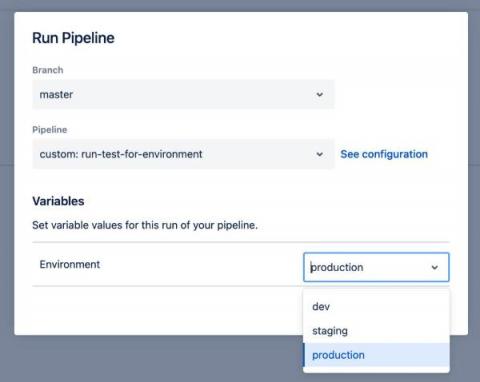
Support for including default values in custom pipelines has been a highly requested feature. We are happy to announce that this feature is now live. Providing a default value helps avoid errors when you manually trigger a custom pipeline. If you often rely on the same value for certain variables, it can be frustrating to get a failed build when you forget to specify the value or have a typo when providing the value.
Bitbucket Pipelines provides a Docker caching feature that can help improve build times. However, the limitation is that only compressed caches under 1GB are saved and can be used. In this blog, we outline a process showing how you can use compressed caches that are larger than 1GB. With Docker versions >= 19.03, you can use the BuildKit feature. With BuildKit, you don’t need to keep the cache locally before building the Docker image since it caches each build layer in your image registry.
In this video, we’ll discuss the new Change Calendar feature in Jira Service Management Cloud which allows teams to view, create, and schedule change requests, providing greater visibility for past, present, and future changes across an organization.