Operations | Monitoring | ITSM | DevOps | Cloud

What Is High Availability? How It Works and How Many Nines You Actually Need

High availability (HA) is a system’s ability to keep serving users when individual components fail, from a single server up to a whole cloud region or provider. It is measured in nines: 99.9% allows about 8 hours 46 minutes of downtime a year, 99.99% about 52 minutes, and 99.999% about 5 minutes 15 seconds. HA works by removing single points of failure through redundancy, health checks, automatic failover, and replicated data.

First CloudWatch Logs on Logit.io

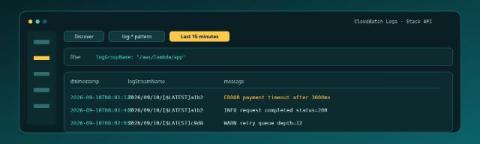
CloudWatch already holds the lines from your Lambda, ECS task, or unified agent. The first useful win on Logit.io is not a migration spreadsheet. It is one Log Group, the documented Lambda shipper posting to this stack's API, and rows in OpenSearch Dashboards Discover that show logGroupName, logStreamName, and message. If you are still proving that a Logs stack can accept anything at all, start with First Logs on Logit.io; this post assumes CloudWatch is the source and the Stack API is the pipe. Contents.


How to Integrate NinjaOne with a SIEM

In this episode of NinjaOne01, Jeff Hunter, Field CTO at NinjaOne, walks through NinjaOne’s new SIEM Exporter App. The app is a dedicated place to set up and monitor the webhooks that send NinjaOne activity data to your third-party SIEM (Security Information & Event Management) system. Note: this is an early access feature, so contact your account manager to have it enabled for your account. What this video covers.

Why AI SRE Agents Need More Than Observability Data with Groundcover | Civo Navigate London

Your AI agent can read every log, metric and trace in seconds. It still can't tell you why things broke. At Civo Navigate London, James Herbert of groundcover explains why AI SRE agents need that context to travel the whole development lifecycle. He shows how agents embedded in the tools where software is built and run can move from isolated tasks to investigating and acting with the full picture.

What Is RMM (Remote Monitoring and Management)?

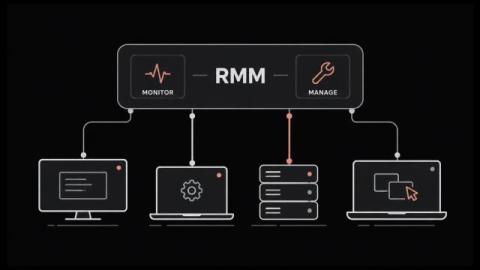
RMM lets one small team look after thousands of machines nobody will ever physically touch. It grew up inside managed service providers. The whole category runs on agent-based monitoring, which means a small program sits on every endpoint and phones home on a schedule. That agent is also why attackers have taken such an interest lately. In this blog, you'll see: By the end you'll know what the category covers and where it stops. RMM stands for remote monitoring and management.

SSL Handshake Guide Covering Each Step and the Fixes That Prevent Outages

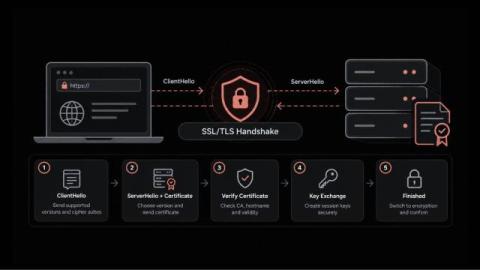
Why would a website that passes every uptime check still show customers a security warning? In most cases, the server is running and the network is healthy. The failure happens earlier, during the brief exchange in which the browser and the server agree on how to communicate securely. That moment is the SSL handshake. If it goes wrong, users get an error page while your dashboards stay green. Maybe a certificate expired; maybe a routine change left both sides on different protocol versions.

Meet Rosetta

During an incident, the answers an engineer needs are spread across tools. Telemetry sits in one place, configurations in another, and tickets in a third. Building a complete picture means knowing which tool holds which piece and how to query each one, usually under time pressure. Rosetta is the conversational interface for Selector Foundry, the agentic NetOps platform built on Selector’s existing AIOps and Observability solution.

How Configuration Monitoring Helps Detect Zero-Day Activity

Last updated: October 9, 2026 A zero-day vulnerability may be unknown, but its effects often are not. Exploitation can leave behind observable changes: a new privileged account, an altered management setting, an unexpected file, a modified access rule, or configuration drift from an approved baseline. That makes zero-day configuration monitoring an important part of a defense-in-depth strategy.

Top Tips: Staying productive during a slow work week

Top tips is a weekly column where we highlight what’s trending in the tech world and share ways to stay ahead. This week, we’re looking at what you can when you’re having a slow-paced, less hectic workweek. We’ve all been there at intermittent intervals of our jobs: You check into the office right after the weekend only to realize you’re having one of those slow, relatively low-pressure weeks. So what do you do to stay productive?