
How Ad Blocking Works in 2026: What Still Works After Manifest V3

Image Source: depositphotos.com
Ad blocking in 2026 is no longer just about installing a browser extension and forgetting it. The landscape shifted considerably after Google's Manifest V3 rollout reshaped what Chrome extensions can do — and publishers, ad networks, and streaming platforms responded by deploying more aggressive detection and countermeasures. At the same time, users moved beyond browsers into apps, games, and streaming services where browser-based tools never had much reach to begin with.
The result is a more fragmented ecosystem. Whether you're blocking ads in a browser, across mobile apps, or on a shared home network, the right approach depends on where the ads appear. This article explains how ad blocking in 2026 actually works — what still holds up, what lost ground, and why no single tool covers everything.
What Changed With Manifest V3?
To understand ad blocking in 2026, you need to understand Manifest V3 — the extension framework Google rolled out progressively and enforced across Chrome in the 2023–2025 period.
From webRequest to declarativeNetRequest
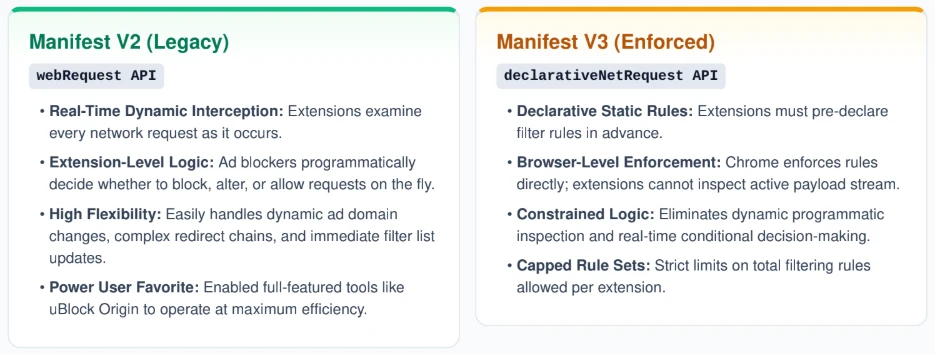
The older Manifest V2 framework gave browser extensions access to the webRequest API, which allowed them to intercept, inspect, and block network requests in real time. An extension could examine a request as it happened and decide whether to let it through. This made ad blockers like uBlock Origin genuinely powerful: they could dynamically block new ad domains, update filter lists on the fly, and catch complex redirect chains.
Manifest V3 replaced dynamic request interception with declarativeNetRequest. Instead of inspecting requests in real time, extensions must pre-declare a static set of filtering rules. Chrome then enforces those rules at the browser level rather than inside the extension.
Why This Matters for Ad Blockers
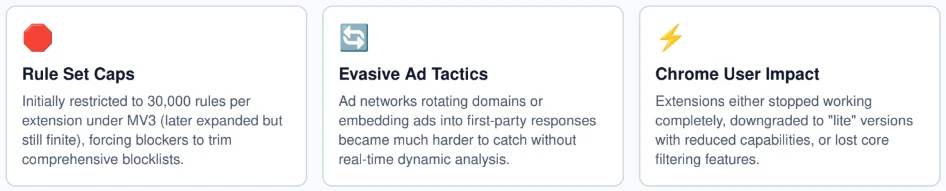
The shift introduced meaningful constraints. Static rule sets have a cap — initially 30,000 rules per extension under MV3, later expanded but still finite. More importantly, the rules must be declared in advance, which means extensions can no longer react dynamically to novel ad patterns or apply complex conditional logic. Ad networks that rotate domains or embed ads inside first-party responses became significantly harder to catch.
Chrome users noticed the practical effect: some extensions either stopped working, switched to lighter MV3-compatible versions, or lost features they previously relied on.
What Stayed Stronger

Firefox did not adopt the same restrictions. Mozilla implemented declarativeNetRequest support for compatibility but continued to allow the full webRequest API alongside it, meaning Firefox users retained access to extensions like uBlock Origin running at full capability. Brave, which has blocking built into the browser itself rather than layered on through extensions, was similarly unaffected. System-level tools that operate below the browser entirely were never touched by MV3 at all — because they don't use browser extension APIs in the first place.
What Browser-Based Ad Blockers Can Still Do
Despite the constraints introduced by Manifest V3, browser extensions remain useful in 2026 — they just do less than they did two or three years ago, particularly in Chrome.
What They Handle Well
Extensions can still block requests to known ad domains using filter lists maintained by communities like EasyList and uBlock Origin contributors. Most common advertising networks — display banners, injected video ads on article pages, affiliate redirect chains — appear on these lists, and extensions can still catch them reliably.
Cosmetic filtering remains largely intact. Extensions can hide ad containers, banners, and sponsored content widgets through CSS-based element hiding, which doesn't require intercepting network traffic at all. This is why pages often load without visible ad slots even when the underlying request might not have been blocked.
Extensions also continue to suppress trackers, analytics scripts, and behavioral data collection — which matters even when you care less about ads themselves.
Where They Fall Short
Browser extensions operate inside the browser. They cannot see or influence traffic from native apps, games, media players, or system-level services. An extension has no way to block the pre-roll ads in a mobile game or the sponsored content inside a social media app.
Detection is also a growing problem covered in more depth below, but it is worth noting here: because extensions interact with the browser DOM, websites can probe for the side effects of blocking and respond accordingly.
In Chrome specifically, browser extensions after Manifest V3 often function as lighter versions of their former selves — effective against static ad placements, less capable against dynamic or server-side ad injection. Firefox still allows stronger filtering and remains the better choice for users who rely on browser extensions as their primary tool.
System-Level and DNS-Based Blocking
For coverage beyond the browser, two approaches have become increasingly important in 2026: system-level blocking and DNS-based blocking. Both operate outside browser extensions, which gives them a fundamentally different and broader reach.
System-Level Blocking
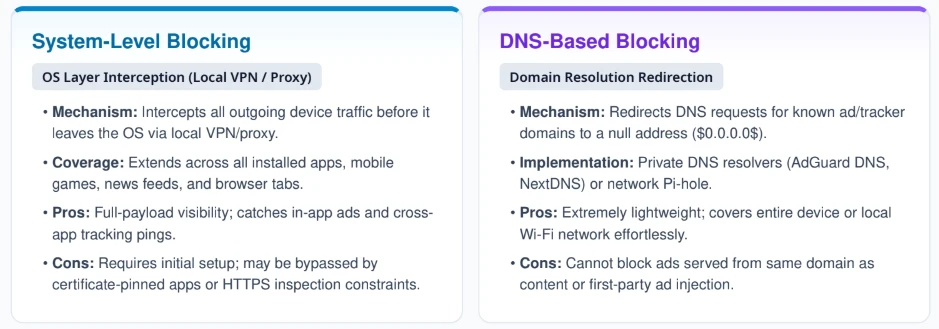
System-level tools intercept network traffic at the operating system layer, typically by establishing a local VPN or a local proxy through which all device traffic is routed. Because they see all outgoing connections — not just what happens inside a browser tab — they can filter ads and tracking requests from any app on the device.
This means pre-roll ads in mobile games, banner ads inside news apps, tracking pings from fitness apps, and in-app advertising that browser extensions cannot touch all become blockable. The trade-off is that implementation requires more setup than installing an extension, and some certificate-pinned apps or apps using HTTPS inspection will route around simple filtering.
DNS-Based Blocking
DNS-level blocking works differently. Instead of intercepting full network traffic, it redirects DNS queries for known ad domains to a null address, effectively preventing the device from resolving those domains at all. This can be implemented through a private DNS resolver (like running AdGuard DNS or NextDNS on a device) or through a self-hosted solution like Pi-hole on a home network.
DNS blocking covers the whole device or network, blocks ads in apps and games, and is lightweight. Its weakness is that it only catches requests to known domain names — it cannot handle ads served from the same domain as regular content (common on streaming services) or first-party ad injection.
Where System-Level Tools Fit

System-level solutions have become the realistic answer for users who want broader coverage than Manifest V3-era browser extensions can provide. Products like AdLock operate as system-level ad blockers, working across apps and the browser simultaneously — making them relevant specifically when a Chrome-only solution is no longer enough. On Android, where browser extension support is limited and in-app advertising is pervasive, a system-level Android ad blocker approach is often the only way to address ads across the full device.

Neither DNS nor system-level blocking is a complete solution on its own, but combined with a browser extension, they address the gaps that MV3 left behind.
Ad Blocker Detection in 2026
Ad blocker detection deserves its own section because in 2026, detection is no longer a minor footnote — it is now a routine part of how publishers manage ad-supported content, and it directly affects how well any blocking solution works in practice.
How Detection Works
Websites detect ad blockers through several mechanisms. The most common is checking whether known ad scripts loaded — if a tracking pixel or ad container script is blocked, the JavaScript on the page can notice its absence. Detection scripts also probe for missing DOM elements: if a div that should contain an ad returns empty or doesn't exist, that signals a blocker is active.
More sophisticated detection listens for the timing of network requests or checks whether specific third-party domains resolve at all. Some sites have moved to serving ads from first-party subdomains precisely to make domain-based blocking harder.
Why Publishers Got More Aggressive
The spread of ad blocking accelerated publisher revenue pressure, and detection technology became cheaper and easier to implement. Anti-adblock walls — overlays that prevent content access until the user disables their blocker — became significantly more common between 2023 and 2026. Some sites moved to softer approaches: messages asking users to whitelist the site, reduced content access, or paywalls triggered only for confirmed ad-block users.
Why This Disadvantages Browser-Only Tools
Because browser extensions operate inside the DOM, they interact directly with the environment that detection scripts are probing. An extension that hides an ad element still leaves traces in the page structure. Detection scripts evolved specifically to look for these traces.
System-level and DNS-based tools that block at the network layer before the browser ever processes the response are harder to detect this way — the page doesn't receive the ad request at all, so there's less for a detection script to probe. This is one practical reason system-level approaches gained ground: they are less visible to anti-adblock walls than browser extension-based blocking.
Where Ad Blocking Still Works Best
Ad blocking in 2026 looks different depending on which environment you're working in. Here's how the main platforms compare:
Chrome — Browser-based blocking still works, but Manifest V3 reduced the capability of extensions. Lighter filter sets, static rules, and easier detection make Chrome the weakest browser for ad blocking compared to its earlier MV2 era. Pairing an extension with a system-level tool helps significantly.
Firefox — Remains the strongest browser for extension-based blocking. The full webRequest API is intact, meaning uBlock Origin and similar tools run at their intended capability. Firefox is the best choice for users who rely primarily on browser extensions.
Brave — Built-in blocking at the browser engine level, unaffected by extension API changes. No extension needed. Brave's shields handle most standard ad and tracker blocking without any additional setup.
Safari — Uses Apple's content blocking model, which is similar in some ways to declarativeNetRequest: extensions declare rules rather than intercept dynamically. Effective for mainstream ad blocking on web pages, but limited for more complex filtering.
Android — Browser-based blocking is limited (Chrome's MV3 constraints apply), and in-app advertising is widespread. System-level or DNS-based tools offer the strongest practical coverage for Android users across both browsers and apps.
iPhone/iPad — Safari blocking through content blocker extensions is the main browser-level option. App-level blocking is more restricted due to iOS architecture. DNS-based solutions can cover some gaps, but app-level ad blocking on iOS remains limited compared to Android.
What Users Should Understand in 2026
A few practical takeaways:
Browser extensions still matter. For web browsing, a well-maintained extension running up-to-date filter lists catches the majority of standard ad placements. Don't dismiss them — they still do real work.
But they are only part of the picture. Manifest V3 reduced their flexibility in Chrome, detection reduces their effectiveness on an increasing number of sites, and they have always been blind to in-app advertising.
System-level tools are now essential for broader coverage. If you use apps, play mobile games, or want consistent blocking across an entire device rather than just browser tabs, a tool that operates at the network or OS level is the practical upgrade.
Ad blocker detection is part of the reality. Some sites will push back regardless of which tool you use. The arms race between blockers and detection is ongoing, and no solution guarantees access to every site without friction.
The right tool depends on where you're trying to block ads. Browser? Extension. Whole device including apps? System-level or DNS. Home network? DNS. There is no single answer that covers everything equally well.
Conclusion
Ad blocking in 2026 is more fragmented than it was even three years ago. Manifest V3 changed what browser extensions can do inside Chrome, reducing their flexibility and making them easier for detection scripts to identify. Publishers responded with more aggressive anti-adblock measures, and the advertising ecosystem adapted to make first-party ad serving harder to catch with domain-based filters.
At the same time, system-level and DNS-based tools expanded to fill gaps that browser extensions no longer cover. Brave and Firefox held their ground by not following Chrome's path, and users with broader needs moved toward solutions that operate below the browser level.
Understanding ad blocking in 2026 means understanding that "blocking ads" is not one action but several, applied at different layers of a device and network. Choosing the right approach starts with knowing where the ads you want to block actually live.