
My Room Still Looked Wrong - Until I Tried an AI Home Design Generator

I didn’t expect much when I first tried an AI Home Design Generator and an AI Image to Image Generator. At that point, I wasn’t trying to redesign anything seriously. I just knew my room looked… off. Not terrible, just never quite right. Every time I took a photo, something felt wrong — the layout, the lighting, maybe both.
I kept moving things around, thinking it was just a placement issue. Bed a little to the left, desk against the wall, then back again. Nothing really fixed it. At some point I just got tired of guessing and thought, there has to be a faster way to see what actually works before I start dragging furniture again.
I Tried Doing It “Properly”… That Was a Mistake
My first instinct was to do it the “right” way. Look up inspiration, maybe model it out.
So I did what everyone does — opened Pinterest, saved a bunch of clean, minimalist rooms, convinced myself I could recreate something similar. That fell apart pretty quickly. Those rooms are designed for photos. Mine… isn’t. Weird angles, bad lighting, random stuff I can’t just throw away.
Then I tried SketchUp. Bad idea.
I spent maybe 30–40 minutes just setting up the room, adjusting measurements, trying to get the camera angle right. And at some point, I just stopped and thought — why am I doing this? I wasn’t even sure what I wanted yet, and I was already deep into details.
That was probably the moment I realized the whole workflow was wrong. I was trying to be precise way too early.
This Is Where Things Started to Click
Instead of building anything, I took a photo of my actual room and ran it through an AI Image to Image Generator.
That felt different immediately.
I wasn’t guessing anymore. I wasn’t imagining what a “better version” might look like — I could actually see it. Different styles, different lighting, slightly different setups. Some warmer, some more minimal, some honestly a bit weird.
This is roughly what I got back:
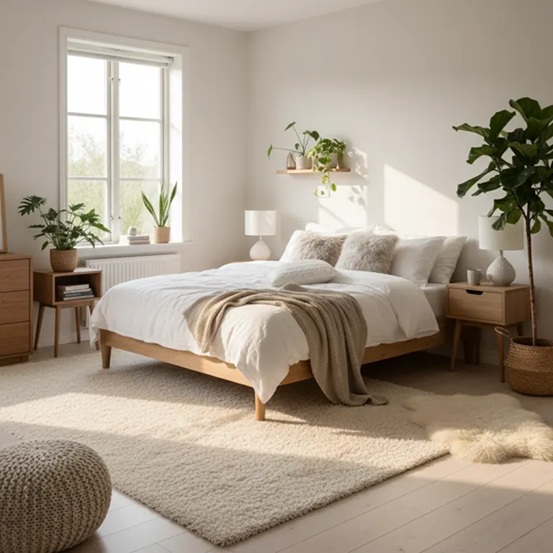
Same room, different style — generated from a single photo.
And yeah, not all of it made sense. One version added a chair that would literally block the door. Another one somehow created a window that doesn’t exist in my room. I remember just staring at that like… where did that even come from?
But even the bad ones helped. They gave me directions. Before that, I had nothing.
The only issue was — it still didn’t fix the layout. Everything looked better, but the room itself was still kind of awkward.
Then I Realized — Style Wasn’t the Real Problem
At some point it clicked that I wasn’t actually struggling with style. I was struggling with space.
That’s when I tried the AI Home Design Generator on AIAI.com, mostly out of curiosity. I didn’t expect much, to be honest. But this part actually surprised me.
Instead of just changing how the room looked, it started shifting things around. Not dramatically, just small adjustments that made more sense — moving the bed slightly, adjusting the desk position, opening up space I didn’t realize I had.
One of the layout ideas looked like this:

Same room, but rethought layout instead of just visual style.
It wasn’t perfect. Not even close. One version placed a shelf in a spot where I literally couldn’t open the door. Another ignored where the outlets were, which… yeah, not helpful.
But still — it gave me something I could react to. And that’s what I was missing before.
I Started Going Back and Forth (And That’s What Worked)
After a while, I stopped treating these like separate tools.
I’d run a photo through the AI Image to Image Generator, find a style I liked, then move over to the AI Home Design Generator on AIAI.com to see if the layout could actually support it. Sometimes I’d go back again, tweak things, try another version.
It wasn’t clean. It wasn’t efficient in a “perfect system” kind of way. It was more like… trying things until something felt right.
And honestly, that worked better than anything else I tried.
One Small Change That Actually Stuck
There was one moment where this stopped being “just experimenting.”
In one of the layouts generated on AIAI.com, the desk was rotated and pushed closer to the window. I wouldn’t have tried that on my own. I assumed it would make the room feel tighter.
But visually, it worked.
So I tried it in real life.
And yeah — it actually made a difference. The room felt more open, less cramped. That one change stuck, and it’s still like that now.
Not Gonna Lie — It Gets Things Wrong
This isn’t one of those “AI solves everything” situations.
It messes up. A lot.
I’ve seen layouts where furniture overlaps, lighting makes no sense, or things just feel off in a way that’s hard to explain. There was one version where a lamp was basically floating halfway into the bed. Looked cool for half a second, then you realize it’s completely unusable.
So yeah — you still need to think. You can’t just trust whatever comes out.
What Changed for Me
The biggest shift wasn’t the tools themselves. It was how I approach the whole thing now.
I don’t start by measuring everything or opening software anymore. I start with a rough idea, run it through an AI Image to Image Generator, then test the structure with the AI Home Design Generator on AIAI.com, and only after that do I actually move anything in real life.
It just feels lighter. Less guessing, less wasted effort.
Before this, I’d spend way too long trying to get things “right” from the start. Now I’m okay being wrong a few times, as long as I get there faster.
I Still Don’t Have a “Perfect” Room
And honestly, that’s fine.
It’s still not perfect. Some things don’t match, some corners are still awkward. But at least now I know what I’m changing and why.

I’m not just moving things around hoping it works.
And that alone made this whole process way less frustrating than it used to be.