Operations | Monitoring | ITSM | DevOps | Cloud

Elasticsearch Service is now generally available on Microsoft Azure

Following the fully featured public beta of the Elasticsearch Service on Microsoft Azure earlier this year, we are pleased to declare it is now generally available! Existing Elasticsearch Service customers can log in and launch deployments on Azure in their existing accounts, and new users can get started with a free 14-day trial of the Elasticsearch Service.

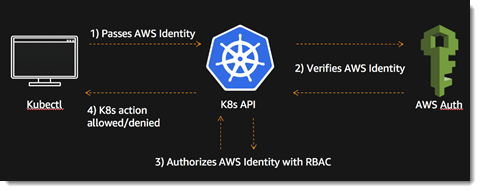
How to View Logs in Kubectl

Kubernetes has become the de-facto solution for container orchestration. While it has, in some ways, simplified the management and deployment of your distributed applications and services, it has also introduced new levels of complexity. When maintaining a Kubernetes cluster, one must be mindful of all the different abstractions in its ecosystem and how the various pieces and layers interact with each other in order to avoid failed deployments, resource exhaustion, and application crashes.

Simplified Monitoring for AKS Deployments with Logz io

To deliver reliable, performant, and secure microservices on AKS, DevOps teams must be prepared to identify and fix production issues before they impact customer experiences. However, considering the scale and variety of log data generated by modern AKS deployments, gaining observability into AKS and the applications it powers is a significant data analytics challenge.

BKD-backed geo_shapes in Elasticsearch: precision + efficiency + speed

With the addition of new data structures in Lucene 6.0, the Elasticsearch 5.0 release delivered massive indexing and search performance improvements for one-dimension numeric, date, and IP fields, and two-dimension (lat, lon) geo_point fields. Building on this work, the Elasticsearch 6.0 release further improved usability and simplicity of the geo_point API by setting the default indexing structure to the new block k-d tree (BKD) and removing all support for legacy prefix tree encoding.

Image recognition and search at Adobe with Elasticsearch and Sensei

Software giant Adobe is known the world around for its Photoshop, Illustrator, and Acrobat products, which are rolled into cloud service suites — Creative Cloud, Document Cloud, and Experience Cloud — of other similar software offerings. A number of their products — especially those where image search is critical, such as Adobe Stock — feature slick search capabilities that use Elasticsearch behind the scenes.

Introducing the enrich processor for Elasticsearch ingest nodes

As part of Elasticsearch 7.5.0, a new ingest processor — named enrich processor — was released. This new processor allows ingest node to enrich documents being ingested with additional data from reference data sets. This opens up a new world of possibilities for ingest nodes.

All The Logs For All The Intelligence

If you are reading this, I don’t have to convince you any further of the powerful intelligence we can derive from logs and machine data. If you are anything like the many, many users, customers and prospects we have been talking to over the years, you might, however, have some level of that pesky modern condition commonly known as volume anxiety. The volume here, of course, is the volume of data––there is a lot of it, and it keeps growing.

Ingesting Cloudtrail Logs with the Graylog AWS Plugin

Cloudtrail logs provide excellent insight into how your AWS account is being used. They record all activity by the web console, SDKs, and APIs. With help from the AWS plugin, getting this information into Graylog is easier than ever. In this blog post you'll set up the required AWS resources, configure the Graylog input, and do some basic searches to explore its capabilities.