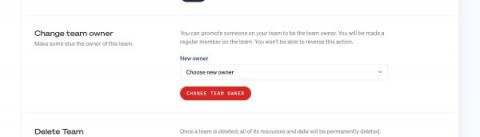
Changing the owner of the team can now be done in our UI In the past, we've seen users reach out to support to change the owner of a time for a variety of reasons. You can now change the owner of the team without contacting support. Just head over to the team settings and scroll down. As the owner of a team, you can move ownership to another member of your team. Because this action cannot be reversed, it needs to be confirmed.
Some of our users have a lot of sites in their Oh Dear account. A feature often requested is the ability to add a little bit of meta information about each site. To do that, we've introduced the ability to add tags to a site. Tags can be used for instance how important it is to fix a problem with the site immediately. Possible tags could be important or has support contract. Another use case would be to add the technology used, tags could be named wordpress, laravel, js.
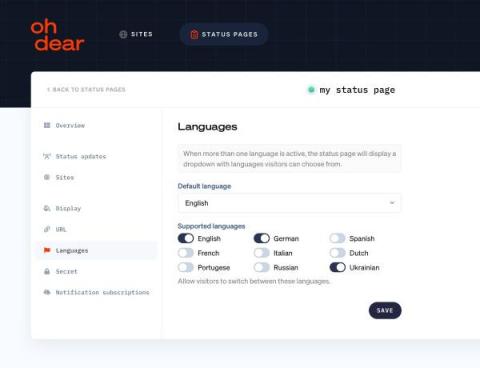
In addition to performing various checks to monitor your site, Oh Dear also offers beautiful status pages. Status pages can now use multiple languages. Using these status pages, you can inform your audience about the status of your service. Here's the beautiful Oh Dear powered status page of the Laravel team. Some of our users have a global, multi-lingual audience. That's why we now added support for a status page to be displayed in multiple languages.
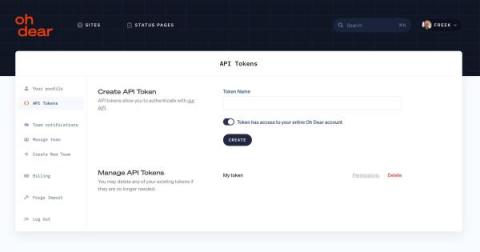
Oh Dear has an extensive API that powers various powerful integrations. To use the API, you first need to create an API Token in the Oh Dear UI. Previously, such a token could be used to make API calls to any site or status page in your Oh Dear account. We noticed that some of our users are agencies that use Oh Dear to monitor their clients' sites.
We're proud to announce we have added a new check to our service: Lighthouse SEO. Using this check you can detect (and get solution suggestions) for SEO and performance problems.
As of today, Oh Dear is in a brand new jacket. We've totally redesigned Oh Dear's UI. Our app doesn't only look better, but we've also made it much easier to use. We feel that our new design should speak for itself, so we highly recommend visiting the home page, browsing a bit around, register an account, or log in, and discover the redesigned app yourself. If you've been using Oh Dear before, you'll notice that we polished everything, and the UX should be much better.
Earlier this year, we announced that one of our goals for this year is to bring the UI of Oh Dear to the next level. Behind the scenes, our team is working hard on a complete rewrite of our marketing website and app. We're currently targeting the end of September timeframe to launch our redesign. In this blog post, we'd like to give you a preview of the redesign.
In a typical Laravel application, you'll likely to have many routes, config files and possible some events. In your development environment these routes and config files will loaded and registered in each request. The performance penalty for this is not too big. In a production environment, you want to cache these things. Laravel makes this easy by offering a couple of Artisan commands that you can use in your deployment procedure.
When registering a domain name, you could assume it is yours forever. Unfortunately, this is false, and most domains must be renewed periodically. If you fail to do this, you risk losing your domain, and ownership could be transferred away from you. Oh Dear's new Domain check can send you a notification days before your domain expires. This way, you still have time to renew it.