How to monitor and troubleshoot CoreDNS
Find out how to effectively and easily monitor and troubleshoot CoreDNS using Netdata.


Find out how to effectively and easily monitor and troubleshoot CoreDNS using Netdata.
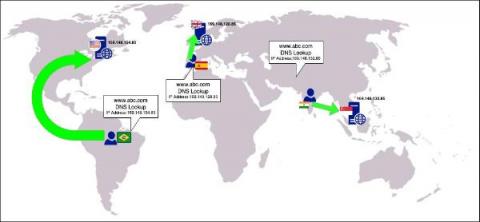
Latency is the key differentiator when it comes to application performance on the internet. Reduced latency accelerates the delivery of apps. DNS resolving is the first step towards application delivery and it involves a series of steps. Prior to Anycast DNS, the DNS servers responsible for resolving users’ DNS requests were sitting continents away from many users, contributing to the high latency and slow delivery of applications.
DNS resolution is the first step taken to form an internet connection. This includes when any device is being used to access a website or any type of internet-enabled application, such as e-commerce, CRM, or food delivery. These applications are connected to the internet via IP-backbone, which is typically controlled by a protocol named BGP (Border Gateway Protocol). Each application has a unique numbering schema on the internet, referred to as IP address.
DNS (Domain Name System) servers translate standard language web addresses to their actual IP addresses for network access. DNS response time is the time it takes a Domain Name Server to receive the request for a domain name’s IP address, process it, and return the IP address to the browser or application requesting it. When it comes to DNS response times, the lower the better, and generally values less than 100ms are considered to be in the acceptable range (depending on the application).
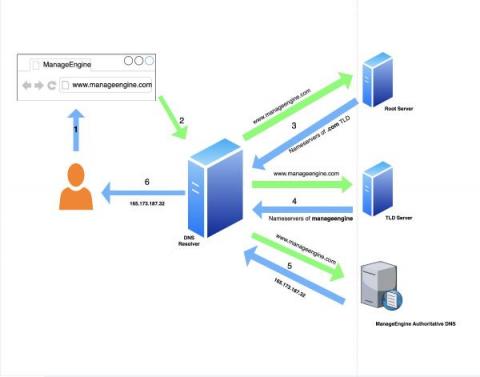
The DNS is the most critical part of network infrastructure and the only doorway to the internet. We at ManageEngine, a division of Zoho Corp, understand this criticality well and have carefully designed software that helps IT infrastructure management professionals securely manage their domains’ DNS records and elude modern problems in DNS management. We’re excited to introduce ManageEngine CloudDNS, the first critical infrastructure management software in our portfolio.
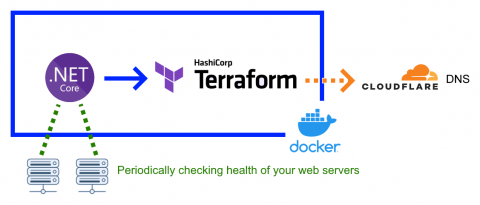
We created experimental Docker image which tries to ensure high availability of your web service by dynamically refreshing Cloudflare DNS with healthy endpoints.
How do I prevent DNS related Issues from affecting my status page? This is a very common question we receive from customers at Statuspal. That is what we decided to write an article with suggestions that answer this question.
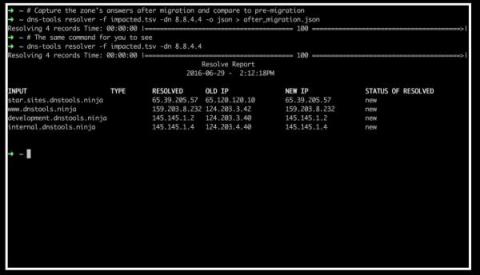
Migrating your DNS to a cloud-based service like Amazon’s Route53 service can be a daunting task. With dns-tools, you can test your DNS records before and after the migration to ensure that everything made it across in one piece. If you are migrating from a BIND DNS server, see our blog post here. Follow these four steps to migrate from a Windows DNS Active-Directory integrated server to Route53.
Data center and cloud migrations often require changing IP addresses of your servers and application end points. These changes require careful planning and precise execution in order to minimize downtime. Typically, this is executed by manually searching your DNS server’s configuration for each server that is migrating.
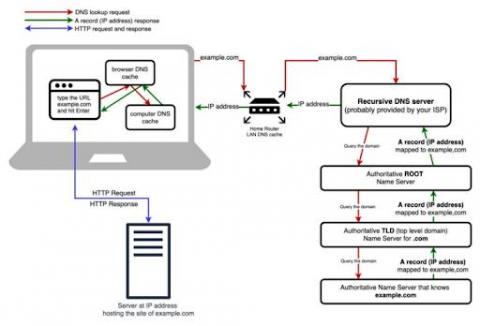
The Internet is a vast network of servers and devices connecting people worldwide. It allows for near-instant data communication between machines, which is presented in a readable format for the end-user. From a human perspective, it's a simple case of typing the URL of your desired website and pressing enter. Of course, computers talk to one another in their own numerical language, using lengthy IP addresses to refer to domains instead of URLs.