InfluxDB IOx Tech Talks: Performance Profiling in Rust
InfluxDB IOx Tech Talks: Performance Profiling in Rust.


Everyone says the cloud is the future. Sure, but try telling that to someone who has terabytes of sensitive data stored in an on-prem InfluxDB Open Source (OSS) instance, and they will bring up a whole set of reasons why it doesn’t make sense for them to move into the cloud right now. There are also some use cases which make more sense for on-prem software deployments.
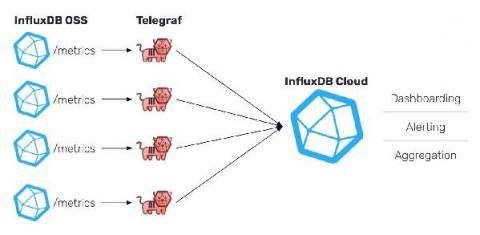
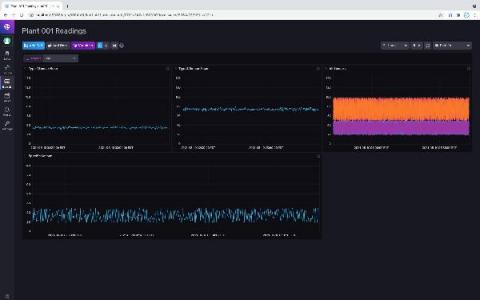
In this post, we will describe a simple way to share data from multiple InfluxDB 2.0 OSS instances with a central cloud account. This is something that community members have asked for when they have OSS running at different locations, but then they want to be able to visualize some of the data or even alert on the data in a central place. Please note that while the method presented here is simple and fast to set up, it has many limitations which may make it inappropriate for your product use case.
Since the initial release of InfluxDB OSS 2.0 in November 2020, more than 10% of the community has successfully upgraded, and the pace of the upgrades continues at a steady rate. We have released a number of maintenance releases to address defects, expand platform coverage, and enhance the update experience based on feedback.
One of the things we needed to either adopt or build for InfluxDB IOx is a database catalog. If you haven’t heard us talk about it yet, InfluxDB IOx (pronounced eye-ox) is the new in-memory columnar database that uses object storage for persistence. We’re building it as the future core of InfluxDB. A database catalog usually contains the definitions of a database’s structure like schema and indexes.
This article will show how we kept cardinality under control with a few tweaks in the Telegraf configuration. If you’re not yet familiar with it, Telegraf is the native and open-source plugin-driver metrics collection agent of InfluxDB. As you may know, cardinality is the combination of measurements, tags, sets, fields, and values in a time-series database, and having high cardinality can be a challenge.
One of the great things about SaaS applications is that users in the platform automatically have access to any available software updates. Yet, having a beta program requires a separate environment, creating a potential challenge for users and development teams. In this context, having a tool where you can control features and flag certain users is important because sometimes features are too early or not relevant for all users.