Operations | Monitoring | ITSM | DevOps | Cloud

The latest News and Information on Continuous Integration and Development, and related technologies.

Set Up Your Deployment Pipeline Like a Rockstar!

Nowadays, software development teams utilize continuous delivery or some variation, to create better, faster, more accurate software releases. Continuous delivery is a DevOps practice that empowers software teams to continuously ship code directly to an environment once automated tests pass. Continuous delivery is facilitated through the deployment pipeline. You can read more about it in a previous post.

[Webinar] Kubernetes Applications Log Monitoring For DevOps With JFrog And Platform9

By design Kubernetes applications generate a high volume of log data across what could be hundreds of nodes. Centralized logging becomes critical for production applications, as it is otherwise near-impossible to quickly find the correct log file, and logs can be lost when pods crash.

What is GitLab CI/CD

GitLab CI/CD is a tool that is built into GitLab. It allows you to create automated tasks that you can use to form a Continuous Integration and Continuous Delivery / Deployment process. You configure GitLab CI/CD by adding a yaml file (called `.gitlab-ci.yml`) to your source repository. This file creates a pipeline, which will then run when a code change is pushed to the repository. Pipelines are made up of a series of stages, and each stage can each contain a number of jobs or scripts.

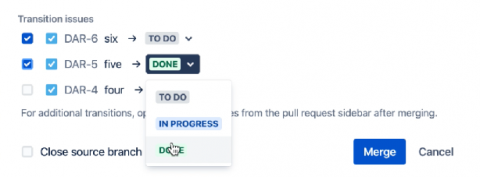
Transition Jira issues on merge

Developers understand the importance of keeping their team up to date on work and use many of the integrations between Bitbucket Cloud and Jira like smart commits and automation triggers to do so automatically. However there may be times where there are nuances or uncommon situations when merging a pull request that aren't covered by existing automation rules – sometimes there are multiple pull requests, or sometimes merging means you're now in 'Done' and other times you're in 'Releasing'.

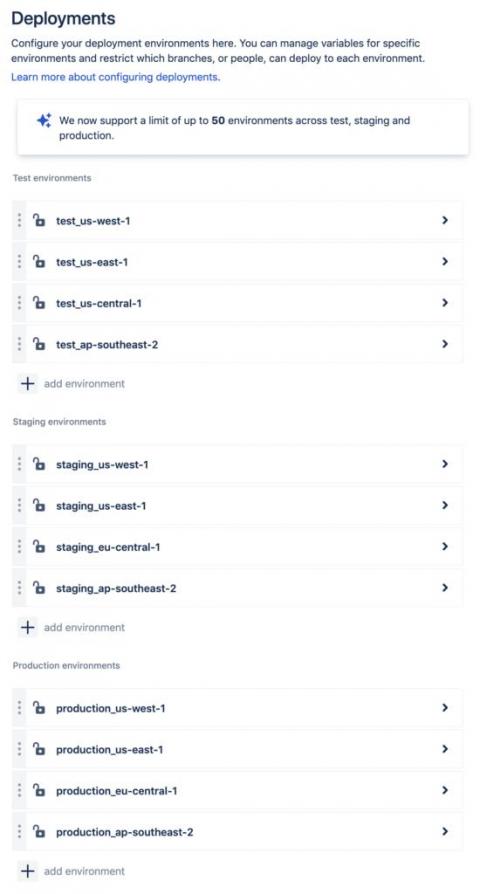
Additional deployment environments for Bitbucket Pipelines

Bitbucket Pipelines provides teams with a one-stop solution to build, test, deploy and track their code, without ever leaving Bitbucket. Developers and release managers can easily track and visualize deployments, while non-technical teams can have visibility into what features are coming down the pipeline.

Migrate NGINX from "stable" Helm Charts Repo with ChartCenter

For the last four years, anyone wanting to deploy the Ingress NGINX Controller for Kubernetes would find its official Helm chart nginx-ingress in the stable repository maintained by the Helm project. Those days are over. And not just for NGINX, the most popular Ingress Controller used as a reverse proxy and load balancer, but for all open-source K8s apps. With the advent of Helm 3, the Helm project is deprecating the stable repositories.

4 Bitbucket and Slack hacks to speed up your workflow, from actual devs

While working from home is the new normal, communicating and collaborating virtually hasn't become any easier. And for developers, being productive while at home has its own set of challenges (we're thinking of things like figuring out how to pair program over Zoom or how to make do with only a single monitor). In times like this, our engineering team has been relying on one short-cut towards productivity: the Bitbucket Cloud bot for Slack.

Automatically (or manually) tag your Sleuth deployments

All deployments are not created equal, but you'd never know it from your Slack channel notifications. In reality, some deployments you really care about, as they contain things like API changes or database migrations, and you want that information to surface. We created tags in Sleuth for this very reason. Out of the box, Sleuth matches files in your deployment with known patterns, and if any are found, tags your deployments automatically.