Setting up Sentry Alerts based on an issue’s level is one of the most effective ways to filter out noisy notifications and receive notifications for high priority errors. Follow along to this demo to see how.
Want to know when a new issue in Sentry starts to become a problem? Learn how the New Issue Alert Rule can help you prioritize new errors that need your attention. Follow along to this demo to see how.
TL;DR You deserve a better alerting and on-call tool. So we built Signals. In our early days, we often used the tagline, “You just got paged. Now what?” It encapsulated how FireHydrant solved for all of the messy bits that come after your alert is fired, from incident declaration all the way through to retrospective. At the time, we saw alerting and on-call scheduling as a solved problem.
In the fast-paced world of operations management, every alert bears weight, and Joe’s team found themselves caught in a relentless stream of notifications. The challenge they faced was alert fatigue – a persistent obstacle that blurred the lines between critical incidents and routine matters. As the head of operations, Joe navigated through this influx of alerts, ranging from urgent server issues demanding immediate attention to routine notifications like a failed login.
This article highlights the main benefits, including the ability for users to generate service tickets directly within Microsoft Teams, leading to streamlined workflows and faster response times.
Alert fatigue is a serious issue that affects numerous professions, e.g. in IT or healthcare. It can lead to neglecting critical events and delaying response times. Responders need to continuously monitor their systems and applications to avert possible downtime and keep operations running smoothly. However a high number of incoming alerts inundating these teams can make them less responsive. The ramifications of such disregard can severely affect the efficiency and dependability of response teams.
We're thrilled to announce the latest enhancements to ilert AI in our most recent update. For those eager to dive into AI functionalities firsthand, we invite you to reach out to us at support@ilert.com. We'd be more than happy to welcome you into our Beta program. Moreover, we always appreciate your input on the ilert roadmap and look forward to hearing your innovative feature suggestions. Now, let's delve into the exciting new updates!
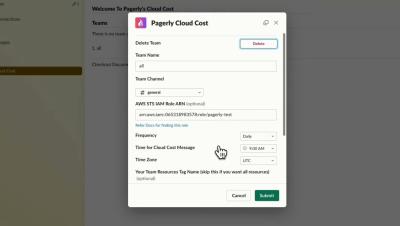
Want to get your Cloud Bill Report on Slack? Want to get alerted when your AWS bill exceeds amount? Want to know your team-wise resources cost on Slack? With Pagerly Cloud Cost App, get your Cloud Reports within Slack. Set your team slack channel, Frequency and Alert threshold. For AWS, we use AWS STS Temporary Role to read your AWS bill. You can also setup team tags to get team wise reports.
Are you looking to differentiate Alerts from Noise? Are you looking to reduce your Alerts counts? With Pagerly , now annotate all your alerts as Noise or evaluate. Evaluate, Examine , Enact your Alerts with Pagerly Annotate if the alert is known to you or if requires any Action. Add remarks and context for handovers. Add action items for tracking tasks on the Alert Whether your runbook is present or not, tag all information in the alert.