Optimizing Microsoft Teams Voice When Returning to the Office Only Complicates Things
Learn more about Microsoft Teams Monitoring: https://martellotech.com/solutions/microsoft-teams-monitoring/


The latest News and Information on Microsoft 365 and related technologies.
Learn more about Microsoft Teams Monitoring: https://martellotech.com/solutions/microsoft-teams-monitoring/
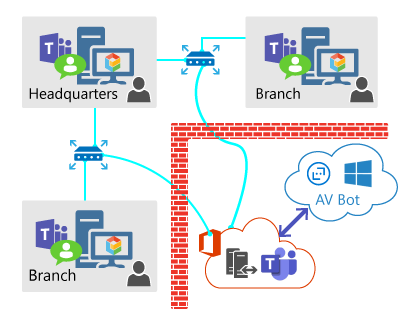
Exoprise released its long awaited Teams Audio Video Conferencing sensor. This sensor fully tests Audio/Video end-to-end capacity, throughput, and network performance through the actual underlying Microsoft Teams and Azure infrastructure. The Teams AV sensor provides deep insight into a network’s capability to handle the Teams/Skype Unified Communications (UC) platform.
If you’re a DevOps practitioner working in a Microsoft-centric environment, you’ll be pleased to learn that Logz.io recently added support for the popular Teams communications hub to help broadcast pressing alerts and other monitoring data. The integration comes on the heels of making the Logz.io platform directly available from within the Azure Console and expands organizations’ abilities to communicate and share notifications about everything from log data to security events.
The IT department of an organization is tasked with helping maintain the productivity of their Microsoft Teams and Microsoft 365 services, facilitating effective service delivery for all users. The executives of the business (VIPs) are sensitive to optimized performance as they must regularly conduct very important calls and meetings.
When using Microsoft 365 services the main benefit of having a monitoring tool that can assess performance quality and identify issues is that it sends alerts into a ticketing tool such as ServiceNow for example, to initiate the process of remediating the problem. When you don’t have a monitoring tool in place then support tickets aren’t automatically sent and users must identify issues and send in tickets manually with little to no information on where the problem came from.