Operations | Monitoring | ITSM | DevOps | Cloud

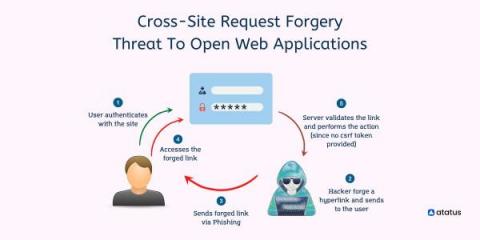
Cross-Site Request Forgery - Threat To Open Web Applications

Cross-site request forgery (CSRF) is an attack that tricks a user's browser into sending a malicious HTTP request to another website. This malicious HTTP request looks like it was sent by the user, but it actually comes from the attacker. A cross-site request forgery (CSRF) attempts to execute a change rather than trying to download personal data. Once an attack is executed there is no way for the attacker to directly monitor the result so attackers often execute multiple forgeries.
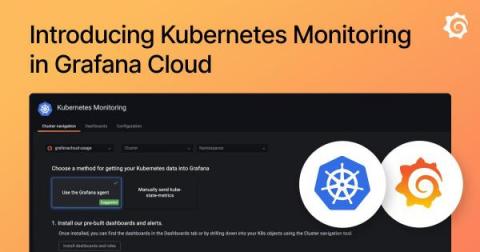
Introducing Kubernetes Monitoring in Grafana Cloud

Kubernetes has quickly become the standard container orchestration technology for developers and companies who want to deploy at scale, iterate quickly, and manage a large number of applications and services. At Grafana Labs, we recognized the need for something more powerful for our users to be able to successfully keep an eye on everything happening inside their clusters.

3 Pro Tips To Get The Most Out Of Qovery - Part 1

Some people spend hours on a spreadsheet and call themselves “Excell Ninja” here at Qovery; we spend hours on our console because, in case you don’t know yet, we test and deploy using Qovery for Qovery. After a year of using our console almost every day, I started to make a list of all the small tips and tricks that I was able to gather, and because sharing is caring, here are my top three tips to use on Qovery.

Migrate your PSPs to Kubewarden Policies!

As announced in past blog posts, Kubewarden has 100% coverage of the deprecated, and soon to be removed, Kubernetes PSPs. If everything goes as expected the PSPs will be removed in Kubernetes v1.25 due for release on 23rd August 2022. The Kubewarden team has written a script that leverages the migration tool written by AppVia, to migrate PSP automatically. The tool is capable of reading PSPs YAML and can generate the equivalent policies in many different policy engines.

Building The Modern Data Stack

As almost 90% of organizations are executing on a multi-cloud strategy for migrating their data and analytics workloads to the cloud, the term “modern data stack” continues to gain more traction. A modern data stack is a suite of technologies and apps built specifically to funnel data into an organization, transform it into actionable data, build a plan for acting on that data, and then implement that plan.

How to Monitor Varnish with Google Cloud Platform

We’re excited to announce that we’ve recently added Varnish monitoring support for Google Cloud Platform. You can check it out here! Below are steps to get up and running quickly with observIQ’s Google Cloud Platform integrations, and monitor metrics and logs from Varnish in your Google Cloud Platform.

The Return of the InfluxDB V1 Shell

The community has spoken and the demand was clear: “BRING BACK THE INTERACTIVE SHELL USED IN 1.X” So it’s back… It works with InfluxDB V2… and has some improvements. The interactive shell allowed users to write data and interactively query data using InfluxQL. For newer users, InfluxQL is the SQL-like query engine that was native to the first major version of InfluxDB.

The 5 Ws (and 1H) of InfluxDB Edge Data Replication

As more businesses generate and process data at the edge, the need to share data from edge nodes to a centralized cloud location increases. Replicating data from the edge to the cloud ensures consistency across an entire application and creates an uninterrupted historical record that preserves the critical context of time. Edge Data Replication (EDR) is a feature available in InfluxDB designed to address this challenge.

Employees Love Using Google Chrome - But Do Their Employers Want Them To?

What’s your web browser of choice? Ask an office full of workers that question and you’ll get a few answers, sure, but one has emerged as a clear favorite: Google Chrome. Holding a collective 60% of the market share in 2021, Chrome has separated itself as the preferred web browser for the general public and modern employees. Here’s the problem: a majority of businesses still set other browsers (predominantly Safari or Firefox) as the default browsers for their employee devices.

A to Z With Observability and OpenTelemetry

How do you go from A to Z with observability and OpenTelemetry? This post answers a question we hear often: “How do I get started on instrumentation with OpenTelemetry, while also following best practices for the long-term?” This article is all about taking you from A to Z on instrumentation. This will help you: We will use a simple greeting service application written in Node.js to understand the journey. You can find the pre-instrumented state here.