Operations | Monitoring | ITSM | DevOps | Cloud

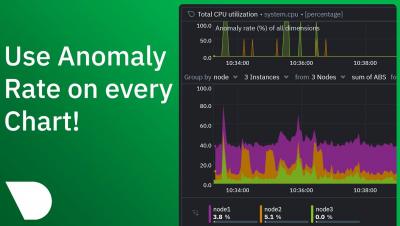
Anomaly rate in every chart

A month ago, we introduced unsupervised ML & Anomaly Detection in Netdata, the Anomaly Advisor. Today, we’re happy to announce that we’re bringing anomaly rates to every chart in Netdata Cloud. Anomaly information is no longer limited to the Anomalies tab and will be accessible to you from the Overview and Single Node View tabs as well. This will make your troubleshooting journey easier, as you will have the anomaly rates for any metric available with a single click.

Time Series Forecasting Use Cases and Anomaly Detection

Wouldn’t it be great to peek into the future and find answers to the problems that you’re facing today? This may sound like science fiction, but many companies currently possess this capability, and they are creating strategies around it to strengthen their monitoring and analytical capabilities. One way is time series forecasting, a statistical method. You can take advantage of the insights of time series forecasting by using techniques like anomaly detection to gain.

Test Driving Machine Learning (ML) Anomaly Advisor

Netdata’s new Anomaly Advisor feature lets you quickly identify potentially anomalous metrics during a particular timeline of interest. This results in considerably speeding up your troubleshooting workflow and saving valuable time when faced with an outage or issue you are trying to root cause.

Anomaly Detection Models in Moogsoft | Moogsoft Product Videos & How-Tos

Moogsoft has several different anomaly detectors, and auto-select the optimum one for given metrics. This video explains each model, as well as how to override the model selected by default. Don't forget to subscribe for content on DevOps, Observability, AIOps and more!

Netdata Machine Learning Meetup

This video livestream meetup by Netdata takes a deep dive into the fundamentals of Machine Learning in DevOps Infrastructure Monitoring. It also covers the Netdata way of approaching Machine Learning. The Anomaly Advisor major update to Netdata is introduced as a valuable troubleshooting tool for any DevOps or Site Reliability Engineer looking for anomalies in their infrastructure. The hosts share real-world infrastructure monitoring & troubleshooting examples, as well as early feedback from the community on the Anomaly Advisor.

Introducing Anomaly Advisor - Unsupervised Anomaly Detection in Netdata

Today we are excited to launch one of our flagship ML assisted troubleshooting features in Netdata – the Anomaly Advisor. The Anomaly Advisor builds on earlier work to introduce unsupervised anomaly detection capabilities into the Netdata Agent from v1.32.0 onwards.

Cyclical Statistical Forecasts and Anomalies - Part 6

At this point we are well past the third installment of the trilogy, and at the end of the second installment of trilogies. You might be wondering if the second set of trilogies was strictly necessary (we’re looking at you, Star Wars) or a great idea (well done, Lord of the Rings, nice compliment to the books). Needless to say, detecting anomalies in data remains as important to our customers as it was back at the start of 2018 when the first installment of this series was released.

CNCF Live: Power up your machine learning - Automated anomaly detection

Our Analytics & ML lead Andrew Maguire recently had a chance to share our new Anomaly Advisor feature with the wider CNCF community. In his demonstration he did some light chaos engineering (using Gremlin and stress-ng) to generate some real anomalies on his infrastructure and watch how it all played out in the Anomaly Advisor in Netdata Cloud. There were also some great questions and discussion from the audience around ML in general and in the observability space itself.

Prevent Data Downtime with Anomaly Detection

A couple months ago, a Splunk admin told us about a bad experience with data downtime. Every morning, the first thing she would do is check that her company’s data pipelines didn’t break overnight. She would log into her Splunk dashboard and then run an SPL query to get last night’s ingest volume for their main Splunk index. This was to make sure nothing looked out of the ordinary.