Something we get asked quite often is, how can I see the size of my Containers in each Storage Account? We know that Azure storage is one of the fastest growing aspects of Azure because it offers almost a limitless supply of storage, so companies are consuming more and more storage at an explosive rate. The question of being able to track this consumption is becoming more and more relevant. OK, so how can I get the size of my containers in a Storage Account?
Logging has been around since programming began. We use logs to debug issues and understand how software works at the code level. After logging and debuggers, profilers are a dev’s best friend when writing code and may run in production with limits to reduce overhead. As we distributed architectures — making systems more complex — centralized log aggregation was soon necessary. At that point, we had to analyze this data. Hence, log analytics technologies were born.
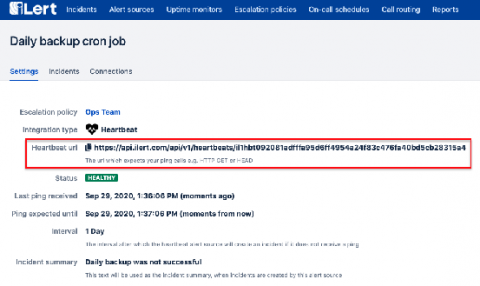
You might have noticed that we’ve added a new type of alert source a few months ago - Heartbeat alert sources: A Heartbeat alert source expects a signal (the “heartbeat” ping) at regular intervals and alerts you, if it doesn’t receive a ping within the specified interval.
The advancement of technology has brought with it the increased adoption of complex IT systems. Every company operates and maintains a gigantic amount of data that is essential to run their business. The server capacity required to handle this amount of data is huge, and the centralized servers are almost kept off-site in remote locations. Server virtualization technologies have also gained popularity since it helps to address data storage limitations and data security concerns.
Many organizations aspire to become true, high-functioning DevOps shops, but it can be hard to know where you stand. According to DevOps Research and Assessment, or DORA, you can prioritize just four metrics to measure the effectiveness of your DevOps organization—two to measure speed, and two to measure stability.
Chicago, Illinois – October 1, 2020 – AlertOps has introduced Heartbeat Monitoring for its incident alerting, on-call management, and response platform. IT teams can use Heartbeat Monitoring to verify their monitoring tools are working properly, providing an added layer of redundancy and visibility. Signals, or “heartbeats,” from external sources verify whether systems connected to the AlertOps platform are working properly.