The team was busy speaking at events in Europe and the US this week, showing off new Grafana features and talking about what’s to come. Check out the presentation on logging in Grafana below; we’ll share the video once it’s available. Also in this week’s issue we have 2 new plugins to share, and your weekly dose of Grafana related blog articles and videos.
In this blog miniseries, I’d like to talk about how to think about doing data analysis “the Honeycomb way.” Welcome to part 1, where I cover what a heatmap is—and how using them can really level up your ability to understand what’s going on with distributed software. Heatmaps are a vital tool for software owners: if you’re going to look at a lot of data, then you need to be able to summarize it without losing detail.
When we released derived columns last year, we already knew they were a powerful way to manipulate and explore data in Honeycomb, but we didn’t realize just how many different ways folks could use them. We use them all the time to improve our perspective when looking at data as we use Honeycomb internally, so we decided to share. So, in this series, Honeycombers share their favorite derived column use cases and explain how to achieve them.
One of the greatest threats to a log management solution is load. As log volume increases, the ability for a solution to process each event decreases. Given enough load, this will result in dropped messages and data loss.
We are very excited to announce a new capability for our Amazon S3 sources. Until recently, the only method Sumo Logic used for discovering new data in an S3 bucket was periodic polling. However, with our new notification-based approach, users can now configure S3 sources such that Sumo Logic is notified immediately (via AWS SNS) whenever a new item is added to an S3 bucket, eliminating the need to wait for new objects to be discovered via periodic polling.
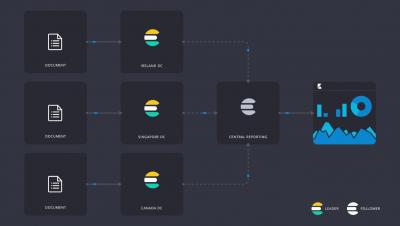
We’re excited to announce the general availability of our new On-Prem, Self-Hosted, and Multi-Cloud logging platforms. Our customers will have the capability to log data in their infrastructure of choice. Whether across multiple public/private clouds or within a customer’s own data center, logs can be viewed through a unified interface while addressing any data locality and performance requirements.