Operations | Monitoring | ITSM | DevOps | Cloud

Optimizing costs in Elastic Cloud: Availability zones and snapshot management

Welcome to another blog in our series on cost management and optimisation in Elasticsearch Service. In previous installments, we looked at hot-warm architecture and index lifecycle management as ways of managing the costs associated with data retention and at managing replicas as a means of optimising the structure of your Elasticsearch Service deployment. Be sure to check out the other blogs in the series for additional tips to help you as you build out your deployment.

Troubleshooting Common Elasticsearch Problems

Elasticsearch is a complex piece of software by itself, but complexity is further increased when you spin up multiple instances to form a cluster. This complexity comes with the risk of things going wrong. In this lesson, we’re going to explore some common Elasticsearch problems that you’re likely to encounter on your Elasticsearch journey.

Building a Python web application with Elastic App Search

This post is a brief summary of a presentation I gave recently where I deploy Elastic App Search, show off the ease of setup, data indexing, and relevance tuning, and take look at a few of the many refined APIs. It’s also written up in a codelab with step-by-step instructions for building a movies search engine app using Python Flask. The app will work on desktop or mobile and is a fast, simple, and reliable way to query the information.

Optimizing costs in Elastic Cloud: Replica shard management

This is part of our series on cost management and optimization in Elasticsearch Service. If you’re new to the cloud, be sure to think about these topics as you build out your deployment. If you are yet to start, you can test out the content here by signing up to a 14-day free trial of Elasticsearch Service on Elastic Cloud.

Upgrading the Elastic Stack: Planning for success

"Upgrade" can be a four-letter word for admins, so at Elastic, we try to make the upgrade process as simple as possible. Why? Because we pack a ton of goodness into each release, but you can only take advantage of that goodness by being on the latest version of the Elastic Stack. This is also why we make the latest version available on Elastic Cloud the same day that we release.

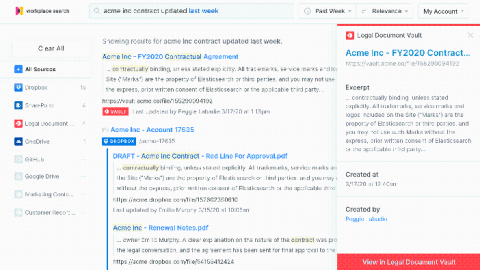
Elastic Workplace Search: Unified search across Dropbox and all your other content sources

Modern cloud storage tools such as Dropbox give teams the ability to easily share and centralize content, conveniently collaborate on projects, and sync data across devices. They’ve proven to be real productivity enhancers, especially with the expansion of work-from-home workforces. But cloud storage tools often end up being a dumping ground for lots of content and various clutter, making it clumsy at best (and next to impossible at worst) to find anything.

Solr vs. Elasticsearch: Who's The Leading Open Source Search Engine?

Searches are integral parts of any application. Performing searches on terabytes and petabytes of data can be challenging when speed, performance, and high availability are core requirements. This blog post will pit Solr vs Elasticsearch, two of the most popular open source search engines whose fortunes over the years have gone in different directions. Both of them are built on top of Apache Lucene, so the features they support are very similar.

How to ingest data from Trello into Elastic Workplace Search

In our previous post, we introduced the concept of the Elastic Workplace Search Custom Source API as a means of adding data for which a prebuilt content source integration isn’t available. We used a simple example — a CSV file of contact information — to demonstrate the process along with the use of the associated REST API. In this post, we explore ingesting data from a more complex organizational source: Trello.