Operations | Monitoring | ITSM | DevOps | Cloud

Tips and Tricks from Elastic Support: Setting up and running your cluster

Setting up and running an Elasticsearch cluster is easy at first, but some planning and design can help preventing many issues when going live gets real and your cluster needs to scale up. Cris da Rocha from the support team at Elastic will present some tips and tricks, learned from the experience of Elastic Support on how to do things better.

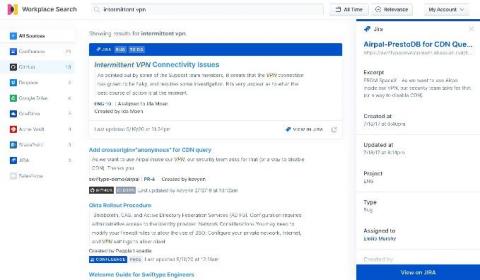
Searching Google Drive: Better collaboration with Elastic Workplace Search

While Google G Suite is an indispensable productivity and collaboration tool for modern businesses, all too frequently content tends to pile up in the far corners of Google Drive, making content search and discovery difficult. Spending valuable time sifting and searching through tens of thousands of documents to find the right one has become all too common, and most workers spend several hours per week searching for information.

How to add powerful (Elastic)search to existing SQL applications

Elasticsearch has a lot of strengths (speed, scale, relevance), but one of its most important strengths is its flexibility to be added to existing environments without the need for any sort of architectural overhaul. If you are a sysadmin (dev, sec, ops, etc.), you know just how appealing this is. So many legacy systems remain in place not because they are perfect, but because replacing them would cost time and money that you don't have.

Improving search relevance with boolean queries

When you perform a search in Elasticsearch, results are ordered so that documents which are relevant to your query are ranked highly. However, results that may be considered relevant for one application may be considered less relevant for another application. Because Elasticsearch is super flexible, it can be fine-tuned to provide the most relevant search results for your specific use case(s).

Searching Salesforce: Boosting your teams' productivity with Elastic Workplace Search

“If it’s not in Salesforce, it didn’t happen.” You’ve undoubtedly heard it, or perhaps you’ve said it yourself. And why not? Over the past 15 years, Salesforce has redefined the CRM industry, becoming the de facto solution for managing sales, customer service, marketing automation, and analytics functions with its cloud-only approach. As Salesforce’s solutions have expanded so has their user base.

Elasticsearch Service on Google Cloud Marketplace: New ways to purchase and discover

Last year we announced an expanded partnership with Google to bring Elasticsearch Service to even more Google Cloud users. We were also named one of Google Cloud's partners of the year! We've since deepened our partnership, and today we are proud to announce new ways to purchase and discover Elasticsearch Service in the Google Cloud Marketplace. You can now purchase monthly Gold and Platinum subscriptions as well as Standard, Gold, and Platinum annual subscriptions through the marketplace.

Elastic Cloud: Elasticsearch Service API is now GA

The Elastic Cloud console gives you a single place to create and manage your deployments, view billing information, and stay informed about new releases. It provides an easy and intuitive user interface (UI) for common management and administrative tasks. While a management UI is great, many organizations also want an API to automate common tasks and workflows, especially for managing their deployments.

Building a Search Engine with Elastic App Search

Building a web application to solve a business problem is easy in today's world. But, how about creating an experience that lets your user spend more time on the service. To do that essentially, we need to equip the application with quintessential features like search. Most of the websites like eCommerce, Food Delivery, Social media rely on search. Search is omnipresent and one can't ignore the users searching for something on your website.