Operations | Monitoring | ITSM | DevOps | Cloud

Log Analysis with Machine Learning: An Automated Approach to Analyzing Logs Using ML/AI

AI log analysis helps IT teams turn massive volumes of operational data into actionable insight. By applying statistical methods, machine learning (ML), semantic analysis, and generative AI, organizations can identify unusual behavior, connect related signals, and investigate probable root causes faster. But AI-generated answers should not be mistaken for proof.
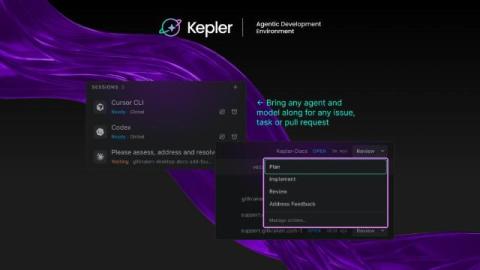
What Is an Agentic Development Environment? Kepler Is GitKraken's Answer.

Every new AI coding agent comes with the same pitch: write code faster. For most devs, that part already checks out. Codex writes a function in seconds. Claude Code refactors a file mid-meeting. Copilot fills in a test before you finish describing it. None of that touches the problem that shows up an hour later: five agents running across three repositories, each with its own diff, and no single place to see what’s stuck, what’s done, and what’s actually safe to ship.

Best AI Infrastructure Providers for Power, Cooling, and Compute

AI infrastructure is becoming a facilities problem as much as a compute problem. Adding accelerators is only useful when the surrounding environment can support them. Power has to reach the rack reliably. Cooling has to remove the heat produced under sustained load. The network fabric has to keep accelerators communicating. Storage has to feed the workload. Orchestration and monitoring then determine whether expensive capacity spends its time doing useful work.

Day 2 Operations for AI-Generated Code: What Changes When You Didn't Write It

We have all watched AI speed up the way we write software. With tools like Copilot and ChatGPT, developers can spin up boilerplate, write complex functions, or draft entire micro services in minutes instead of days. It feels like magic. But there is a silent catch that we do not talk about enough: writing the code is only Day 1. The real challenge is Day 2 operations, which is everything that happens after that code is deployed.

HITL for autonomous agents: Where does the human go?

Human approval is easy when you are sitting in front of the agent. For an agent running by itself in a cluster, almost none of that holds. You’re in a meeting and your agent is running in a cluster. It has a service account, it has been asked to keep a service healthy, and it has just worked out that the right fix is to roll back a database migration. Nobody is watching it. That was rather the point of deploying it. You want to get notified to approve such an important action.

Why AI Creative Workflows Are Moving Beyond Single-Purpose Generators

AI generation is no longer the difficult part of creating digital content. Generating an image from a prompt can take seconds. Creating a short AI video is also becoming increasingly accessible. Editing a background, modifying an object, or producing another visual variation can often be handled with a few instructions. The harder problem appears after the first generation.

Use AI and traffic replay to test AI-generated code

When I ask an AI agent to change code, I also want it to run the application and test what it changed. Asking it to write some tests is a start. But if it invents the expected responses from the same assumptions it used to write the code, those tests can miss the same mistake. Traffic replay gives the agent something concrete to test against: requests and responses captured from a working application.

Manage Cursor costs with Datadog Cloud Cost Management

AI coding tools such as Cursor are becoming a significant source of engineering spend. But Cursor costs can be difficult for FinOps teams to manage. Cursor’s usage data alone doesn’t tell you how costs break down across users and models, and fixed-threshold alerts may not catch an unusual cost spike if spend remains below the threshold. Datadog Cloud Cost Management (CCM) brings Cursor costs into the same place where you monitor cloud, SaaS, and other AI spend.