Trigger arbitrary code from PostgreSQL
In this blog post we show how it is possible to run an arbitrary program, script, or execute arbitrary code in reaction to changes and generally events in a PostgreSQL database.


In this blog post we show how it is possible to run an arbitrary program, script, or execute arbitrary code in reaction to changes and generally events in a PostgreSQL database.
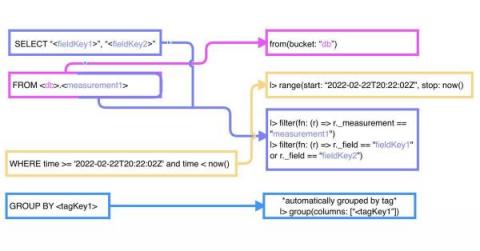
If you’re a 1.x user of InfluxDB, you’re most likely more familiar with InfluxQL than you are with Flux. To gain a deep understanding of Flux, it’s important to understand: However, you can still use Flux without studying those topics. In this TL;DR, we’ll convert common InfluxQL queries into Flux and identify patterns between the two languages to help you get started using Flux more easily if you come from a InfluxQL or SQL background.
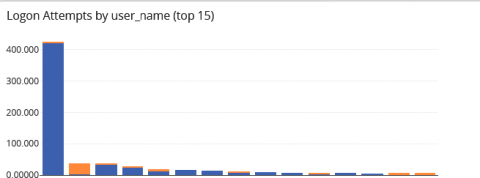
It’s time again for another meeting with senior leadership. You know that they will ask you the hard questions, like “how do you know that your detection and response times are ‘good enough’?” You think you’re doing a good job securing the organization. You haven’t had a security incident yet. At the same time, you also know that you have no way to prove your approach to security is working. You’re reading your threat intelligence feeds.
SIGNL4 is a cloud-based mobile alerting and incident response service. Third-party systems like monitoring tools, control systems or IoT sensors detect abnormalities and transmit events to SIGNL4 over the Internet. What if your systems cannot transmit critical events anymore? That might happen when the Internet is down or when the tool itself has a problem. In this case, SIGNL4 would miss critical events and could not turn them into alert notifications to your IT admins, technicians and experts.
Today I am very excited to announce a major new version of Cloud 66 Prepress, our No Ops tool for deploying static sites. Last year we released Prepress to help our customers deploy static sites to AWS S3. With support for Jekyll, Hugo, and Gatsby, Prepress is everything you need to deploy your static site to your account on all major cloud providers. Today, we are taking Prepress to a whole new level.
The majority of monitoring and management solutions used in enterprises provide their customers with APIs (Application Programming Interfaces) and a CLI to facilitate DevOps type workflows. With IaC (Infrastructure as Code) becoming de facto and ubiquitous, decent APIs have long been a must have on product evaluation checklists; there are of course a few exceptions – namely products aimed only at SMB (Small and Medium Business), immature startups, or freeware.
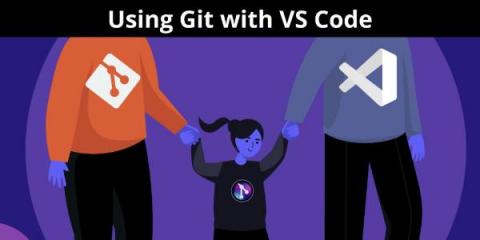
In this article, we will cover how you can combine some of the most powerful tools available to developers–VS Code and Git–to start making meaningful contributions to both open source and private projects. Before we get into driving Git with VS Code let’s start with some background.
As more and more organizations adopt cloud-native technologies, the need to align business objectives and end-user experience with IT infrastructure’s availability and performance is ever-growing. This trend requires infrastructure monitoring setups to ensure that all of your systems are active and working together across your cloud environments, host operating systems, storage systems, etc.
The DevOps and Platform Engineering space certainly is one that evolves fast. As new development paradigms get consumed, supporting the development pipeline is crucial. Pushing a public release of v0.2.x on March 30th, 2022, Dagger, from the creators of Docker, is another approach in portability and consistency in CI/CD pipelines. What the Docker Container has done applications, Dagger is hoping to achieve that with CI/CD pipelines.
Having multiple environments that can be dynamically configured has become akin to modern software development. This is especially true in an enterprise context where the software release cycles typically consist of separate compute environments like dev, stage and production. These environments are usually distinguished by data that drives the specific behavior of the application.