Operations | Monitoring | ITSM | DevOps | Cloud

How to Seamlessly Switch AWS Partners

Working with the right AWS provider can make or break a company, but many companies discover that after a few years, what was once a great fit just doesn’t work anymore. Over time, your needs change, and the provider you’ve been with for years might not be able to provide what you need. Alternatively, maybe your AWS provider simply isn’t living up to your expectations, or perhaps your company is looking to redesign their cloud infrastructure. When this happens, what are your options?

Monitoring as code with Terraform

We try to automate as much as possible in our environments, but we often treat monitoring as an afterthought. In this episode of Stack Doctor, we show you how to automate your monitoring configurations via Terraform. Watch to learn how you can automate the creation of common resources - such as uptime checks, alerting policies, and dashboards - with Terraform!

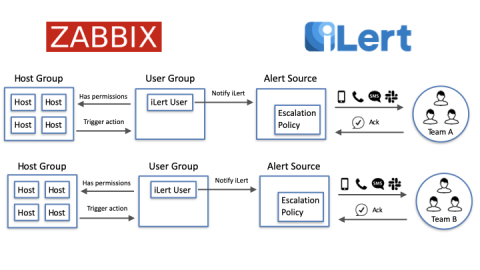
Working with multiple on-call teams using Zabbix and iLert

This post outlines how to use Zabbix and iLert with multiple on-call teams, where each team is responsible for a set of host groups in Zabbix, and therefore, will only receive alerts for the services it is responsible for. But first, let’s start with the basic needs when being on-call.

Calculating IOPS Utilization for EBS Volumes

When looking at an EBS volume in CloudWisdom, you’ll notice that in addition to the metrics we collect from AWS, we also create a number of computed metrics, one of which is netuitive.aws.ebs.iopsutilization. Simply put, IOPS Utilization compares the current number of IOPS that the disk is performing against the total IOPS capacity, and expresses this as a percentage. Thus, if you are currently running 1050 IOPS against a volume whose capacity is 3000 IOPS, the IOPS Utilization would be 35%.

How to defend your IT assets while implementing BYOD policies: The ITOM Podcast [Episode 4]

Gear up! The ITOM Podcast is back with an all new episode intended to help you surmount all your remote work challenges in an IT environment. In the last episode, we discussed VPN monitoring in detail, the challenges encountered while monitoring VPNs, and the key metrics to track to overcome those challenges. This week, we will deep dive into endpoint security and BYOD policies.

Azure MP part 3: Using it with SquaredUp

Now that we have configured the monitoring for a couple of Service types, we should have some data flowing in. The only thing that’s left now is to display this data in dashboards, so it makes sense to us. In this blog let’s talk about displaying in data in SquaredUp. Since its coming from a Management Pack like any other data, it is actually pretty much the same as treating any other Management Pack in SCOM, with different classes.