Operations | Monitoring | ITSM | DevOps | Cloud

elmah.io launches two GitHub Actions in the GitHub Marketplace

While developing the ecosystem around the elmah.io API and App Store, we see an increasing interest and adoption of GitHub and the services around it. We have a range of integrations with GitHub that I’ll introduce you to later in this document. But first of all, I’m happy to announce that elmah.io has been chosen as a GitHub Technology Partner to build integrations in the Marketplace and extend developer capabilities. elmah.io integrates with GitHub in two ways.

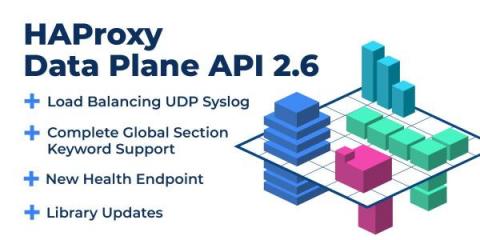
Announcing HAProxy Data Plane API 2.6

In HAProxy Data Plane API version 2.6, we continued the effort of expanding support for HAProxy configuration keywords, as this has been the priority with this release cycle, and it will be in the next one too to meet our goal of achieving complete feature parity with both the HAProxy configuration and Runtime API. This will enable you to use HAProxy Data Plane API for configuring HAProxy without any gaps in functionality.

SharePoint vs OneDrive: What Microsoft Cloud Service Is Best for You?

Microsoft has no shortage of online services, computer products, and digital platforms. The sheer amount of different offerings from the tech giant is enough to make anyone's head spin. When it comes to cloud services, the two Microsoft products that immediately come to mind are OneDrive and SharePoint. But what are the differences between SharePoint and OneDrive, and do you need both? Or can you get by with one? What cloud storage service should you invest in?

Building a Custom Grafana Dashboard for Kubernetes Observability

Distributed systems open us up to myriad complexities due to their microservices architecture. There are always little problems that arise in the system. Therefore, engineering teams must be able to determine how to prioritize the challenges. Viewing logs and metrics of such systems enables engineers to know the shared state of the system components, thereby informing the decision-making on what challenge needs to be solved most immediately.

4 easy ways to keep your knowledge base relevant and up to date

Knowledge is king in today’s information-driven business world, as most knowledge managers like me know. Having the right information at customers' fingertips can greatly influence their perception of the customer support experience. In today’s self-service world, a well-populated knowledge base with a reliable group of contributors is not enough to create a great experience. The content must be relevant and timely.

New Features and Enhancements in SQL Server 2022

In the era of technology defined by cloud computing, features evolve at the blinding speed of continuous deployment. When large software development organizations like Microsoft deliver semi-annual releases of products, like SQL Server, the volume of new features can be so large they can be hard to grasp. Microsoft continues to push the boundaries on what’s possible, both in on-premises and cloud data platforms, and they aim to make the life of data professionals much more manageable.

When and Why To Adopt Feature Flags

What if there was a way to deploy a new feature into production — and not actually turn it on until you’re ready? There is! These tools are called feature flags (or feature toggles or flippers, depending on whom you ask). Feature flags are a powerful way to fine-tune your control over which features are enabled within a software deployment. Of course, feature flags aren’t the right solution in all cases.

Top Incident Response Metrics & How to Use Them

Two categories a software organization should always strive to improve in are: Data analysis is one way that your organization can improve the efficiency of incident management and overall application quality. However, the questions remain – which metrics should be collected? How can analysis of these metrics facilitate these improvements? Read on to hear about five key metrics essential to incident response.

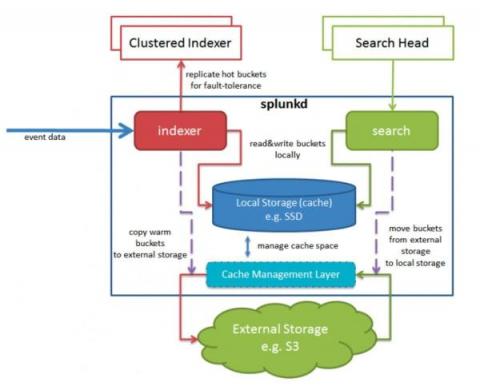
Splunk 9.0 SmartStore with Microsoft Azure Container Storage

With the release of Splunk 9.0 came support for SmartStore in Azure. Previously to achieve this, you’d have to use some form of S3-compliant broker API, but now we can use native Azure APIs. The addition of this capability means that Splunk now offers complete SmartStore support for all three of the big public cloud vendors. This blog will describe a little bit about how it works, and help you set it up yourself.