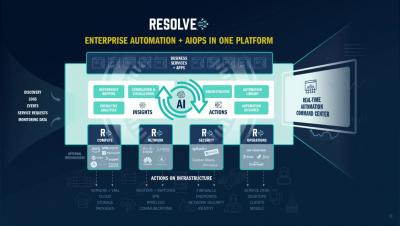
What happens when we combine AIOPS with IT Automation?
In this short video we provide an overview of the power of combining AIOPS capabilities with Enterprise Automation. Recording by Rob Kelsall, VP Sales Engineering for Resolve


As digital transformation continues to be central to an organization’s growth mandate, it’s critical to ensure that customer-facing, revenue-generating, mission-critical applications are operationally reliable and secure. That’s where Sumo Logic comes in—for almost 10 years, we have been providing a Continuous Intelligence platform for DevSecOps that’s utilized by over 2000+ customers in almost every vertical.
It’s been said hundreds of times: in the digital era, customers tolerate no downtime. IT operations teams must keep systems running 24x7x365, as the price of downtime is steep. According to Gartner, in 2014, organizations lost $5,600 per minute of downtime, which worked out to well over $300,000 per hour. Today, it’s likely higher, as organizations increasingly rely on technology to power revenue-generating business services.
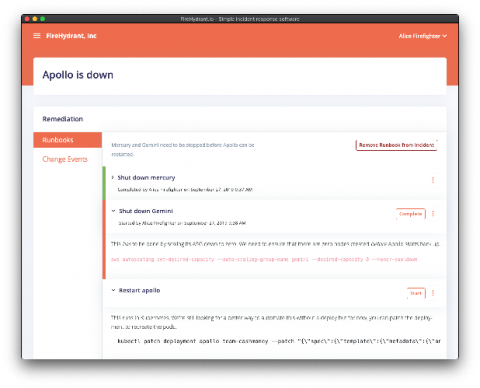
Since the beginning, we’ve wanted to make it faster, easier, and even a joy to respond to incidents. We’ve had the typical components of incident response for a while, but orchestrating them together was a manual task by our users. Today we’re marrying together all the features already available in our incident response tool into our newest release: Runbooks.
In any platform of sufficient complexity, multiple anomalies are likely to occur. For many organizations, NOC operators triage multiple anomalies based on their severity. There are internal, non-customer-facing issues that might affect only a small part of your workforce and one-time issues that affect only a small number of customers. Both of the issues get ticketed and sent to low-level support.
Let’s start with simple definitions. Time series data is largely what it sounds like – a stream of numerical data representing events that happen in sequence. One can analyze this data for any number of use cases, but here we will be focusing on two: forecasting and anomaly detection. First, you can use time series data to extrapolate the future.
As discussed in a previous blog, here at LogicMonitor, we are in the process of rolling out a new user interface (UI) which is designed to streamline workflows, reduce clicks, and include powerful new features. So what’s new in the alerts page?