Mailchimp
Not subscribed to OpsMatters Newsletter


Over the last year, along with Kubernetes, Serverless computing platforms have acquired tremendous mindshare among the development community. As Serverless implementations begin to proliferate, I want to make the case that there are tremendous synergies to be gained by bringing both these paradigms together. Some of these benefits have been covered in previous posts. The majority of enterprises are embarking on their DevOps journey. Scaling such processes across a large enterprise is complicated.
A while back, I wrote about how you can shave latency off every AWS SDK operation by enabling HTTP keep-alive, like this. It had the desired effect and I saw lots of people apply this technique in their projects. But it also resulted in the same 10 lines of code being copied and pasted everywhere! I began thinking about ways to distribute an optimized version of AWS SDK so everyone can benefit.
This month, we are excited to announce a new set of product capabilities and enhancements designed to ensure that teams can work in real time, all the time, wherever they are. Whether they’re on-the-go with their mobile devices or at their desks on a typical work day, we will continue to innovate without sacrificing ease-of-use and adoption.
The typical AWS bill, otherwise known as the AWS Cost and Usage Report, includes line items that are useful to both finance and DevOps. However, many of the metrics that are within engineers’ and cloud architects’ control aren’t so simple to discover. To make cost a first-class operational metric for DevOps, teams need visibility into the data that’s relevant to engineering activity.
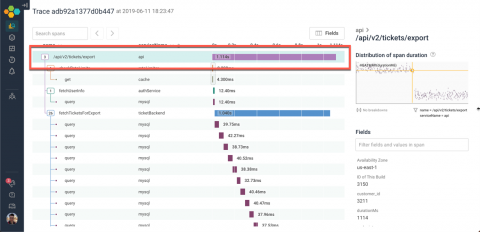
Tracing is one of the key tools that Honeycomb offers to make sense of data. Over the last few weeks, we’ve made a number of improvements to our tracing interface — and, put together, those changes let you think about traces in a whole new way! Tracing makes it easier to understand control flow within a distributed system. We render traces with waterfall diagrams, which capture the execution history of individual requests.
Let’s set the scene: You’re an on-call engineer, working for a dedicated support team. Your priorities are twofold, including, (1) speedy incident resolution and (2) satisfying clients and stakeholders. With these demands in mind, you adopt OnPage’s integration with ConnectWise. The integration streamlines the ticketing-to-alerting process, ensuring that your team achieves client service excellence.
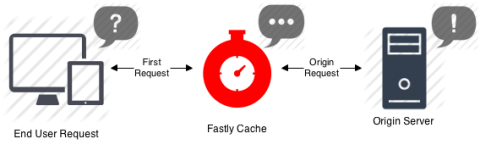
In this blog series, we will cover how Fastly and Sumo Logic empower organizations to deliver best-in-class user experience. For the first installment, we take a closer look at Fastly CDN--what it is and how it works.
Reporting software is a part of a Business Intelligence or BI suite and is used for analysis in early data processing. The purpose of self-service reporting software is to help deliver interactive information that can be put into action. Self-service reporting software allows the user to connect data sources, extract data and present it in various formats of visualization, including charts, tables, and spreadsheets.
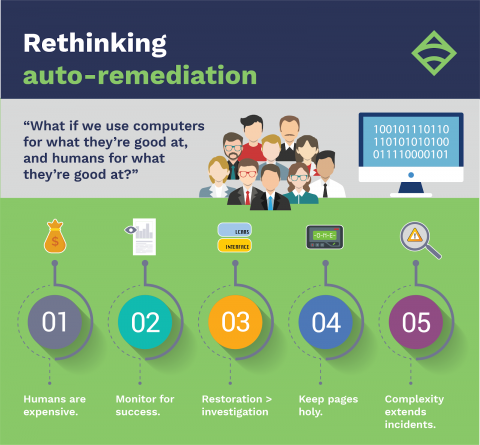
At Monitorama 2018, Engineering Manager Kale Stedman shared Demonware’s journey to assisted remediation, or as he likes to call it: “How my team nearly built an auto-remediation system before we realized we never actually wanted one in the first place.” In this post, I’ll recap Kale’s Monitorama talk, highlighting the key decisions that helped his team reduce daily alerts, fix underlying problems, and establish a more engaged Monitoring Team — including the steps the