Operations | Monitoring | ITSM | DevOps | Cloud

After-Hours IT Support: How to Build a Reliable On-Call Process

IT incidents do not follow a 9-to-5 schedule. A server can go down overnight, a critical application can fail on a weekend, or a high-priority support ticket can arrive when the IT team has already left the office. For IT teams, the challenge goes beyond simply providing after-hours IT support. They need a reliable on-call process that identifies the right responder, delivers critical alerts and ensures timely escalation when necessary.

How to Manage Cloud Alerts: AWS, Azure, and Google Cloud

To manage cloud alerts effectively, define which conditions require immediate action, include useful incident context, and route critical notifications to the engineer currently on call. Add escalation rules for unanswered alerts and test the entire path from detection to response. This process applies whether your team uses AWS, Azure, Google Cloud, or several providers. Cloud monitoring can tell you something is wrong.

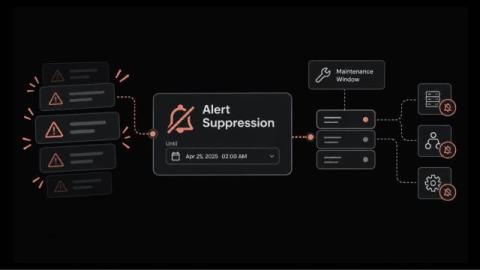
How Alert Suppression Pauses Alerts During Planned Work Without Losing Visibility

How many pages did your on-call engineer get during the last planned firmware upgrade on a core switch? The device stops responding and every dependent check fails. Soon the on-call phone is buzzing with alerts for a change that was approved last week. Alert suppression is a time-limited pause on alerts for a condition you already know about, such as planned work or an issue under investigation. And what is alert suppression from the engineer's side of the console?

8 Best AI SRE Tools in 2026 for Incident Investigation and Reliability

The best AI SRE tools to evaluate in 2026 include Sherlocks AI, Resolve AI, Traversal, Cleric, Rootly AI SRE, Komodor Klaudia, Datadog Bits Investigation, and Dynatrace Intelligence. Each addresses a different part of reliability work, from investigating alerts across multiple systems to diagnosing Kubernetes failures or validating production changes. Choosing the right tool starts with a practical question: where does your team lose time during an incident?

10 Best AI Logging Tools in 2026: Features, Pricing & Comparison

As businesses increasingly integrate artificial intelligence into their applications and workflows, understanding what happens behind the scenes of these AI systems has become essential. AI-powered chatbots, large language models (LLMs), and autonomous AI agents can process thousands of requests, interact with external applications, and execute complex tasks. However, when something goes wrong, identifying the source of the problem isn’t always straightforward. Was the AI response incorrect?

5 Signs Your In-House Ops Team Has Hit Its Ceiling (And What to Do Next)

Every small ops team reaches a point where the work outgrows the people. Tickets arrive faster than they close, the pager goes off at 2 a.m. for the third time this week, and the roadmap quietly slips another quarter. Leadership sees missed deadlines. The team sees a system with no slack left in it. The hard part is spotting the ceiling before it turns into attrition or an outage. This article covers five warning signs that a team is stretched too thin, then shows how to decide what to keep in-house and what to hand off.

Automated Medical Answering Services: Cost and Setup Guide

After-hours calls can create missed messages and send urgent issues to the wrong clinician. For private medical practices, that risk grows when call answering and on-call escalation rely on the same loosely defined workflow. Answering service receives an inbound call, captures information, and categorizes the request. On-call routing identifies the responsible clinician, delivers the message, and escalates it when the clinician does not respond.

New features: ilert AI SRE GA, ilert CLI, Compass and more

ilert AI SRE is now generally available. Alongside it, this quarter brings Compass, a lifecycle assistant that surfaces the next move during an incident, a dedicated space for postmortems, rich incident cards in Microsoft Teams and Google Chat, on-call schedules that follow support hours and holidays, a new CLI, and dark mode. Here's everything that shipped.

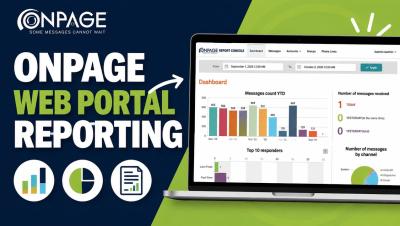
OnPage Web Portal Reporting: Dashboard & Analytics Guide

Learn how to navigate the OnPage Web Portal Reporting Console and gain greater visibility into your organization’s critical messaging activity. In this video, we walk through OnPage’s reporting tools and show how administrators can review alert and message activity, delivery and response metrics, responder performance, account and group activity, and communication trends from one centralized dashboard.

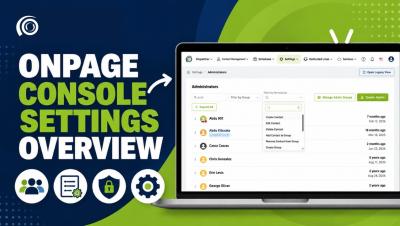
How to Use OnPage Console Settings | Settings Overview

Learn how to navigate and manage the Settings section in the OnPage Console. In this video, we walk through the OnPage Console Settings and show administrators how to manage administrator accounts, permissions and groups, reusable message templates, notifications, security settings, and other organization-level preferences. The Settings section gives administrators a centralized place to configure their OnPage environment, control user permissions, and manage important account preferences.