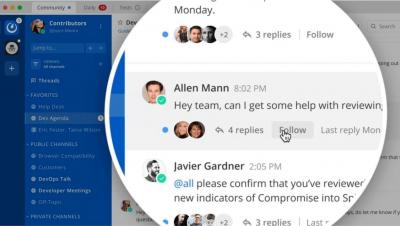
Mattermost - Collapsed Reply Threads Tutorial
Collapsed Reply Threads are here! Get early access to the beta in Mattermost Cloud and Mattermost Self-Managed v5.37 (Available July 17th) and later.


Users of Elastic Security are protected through numerous layers of protections against the REvil ransomware that affected Kaseya VSA and its customers. Elastic Security’s layered protections prevented 100% of the REvil ransomware samples tested before damage and loss could occur to the business. We believe that detections and preventions must be layered, as no single protection works 100% of the time.
DX NetOps 21.2 network monitoring software continues to innovate and improve the scale, speed, and simplicity of network operations with a focused set of high-value features and capabilities. The solution collects data (network faults, performance, events, and alarms) from SDN and WiFi controllers and orchestrators to deliver deep visibility into the health and performance of your modern network deployments. Additionally, the solution correlates data from different network streams.
As you develop your software, you want it to work well, not only on paper but also as the actual users interact with the application. The way to create quality software that is easy to use and bug-free is with end-to-end testing.
The time has come! Users in SIGNL4 can now be a member of multiple teams. This allows for staff to be on duty in multiple groups or departments in parallel and to receive related alert notifications for incidents that occur in the different teams. In addition, you can now also send Signls to multiple teams. All details are available in this article.
A 2020 McKinsey Global Survey found 31% of organizations have fully automated at least one business process, and another 35% of organizations were piloting automation of at least one process. Although automation has streamlined workflows to some degree, it doesn’t provide visibility into processes to aid optimization efforts.
Information is one of an organization’s most important assets. In the global wide area network (GWAN), operations of all sizes store, change, and exchange their business data. Similar to how the meaning of digital data sharing has evolved, aspects like data availability and security have taken on important new meanings as well. Today’s IT administrators need to ensure the network is stable.
Microsoft 365 client applications such as Outlook, OneDrive, and Teams are standalone programs that perform the bulk of the resource and workload processing on a user’s computer. Data retrieval and verification for these applications happen on the client-side, and communication with the server is not continuous. Exoprise customers worldwide use the Office 365 client apps to manage their daily routine and work productively from home, HQ, or branch offices.