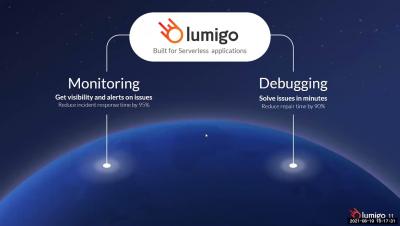
Systems run into problems all the time. To keep things running smoothly, we need to have an error monitoring and logging system to help us discover and resolve whatever issue that may arise as soon as possible. The bigger the system the more challenging it becomes to monitor it and pinpoint the issue. And with serverless systems with 100s of services running concurrently, monitoring and troubleshooting are even more challenging tasks.
Many organizations are shifting vast portions of their applications and infrastructure to the cloud in pursuit of lower IT costs, greater business agility, improved security, and accelerated corporate growth.
Open source software, as the name suggests, is developed in the open. The software can be freely inspected by anyone, and can be freely patched as required to suit the security requirements of the organisation running it. Any publicly identified security issues are centrally triaged and tracked.

The ASP.NET Core framework provides cross-platform support for web development, giving you greater control over how you build and deploy your.NET applications. With the ability to run.NET applications on more platforms, you need to ensure that you have visibility into application performance, regardless of where your applications are hosted. In previous posts, we looked at instrumenting and monitoring a.NET application deployed via Docker and AWS Fargate.
Here is a quick round up of the newest product features, resources, and events!
We are excited to announce that Elastic is joining forces with Cmd to accelerate our efforts in Cloud security - specifically in cloud workload runtime security. By integrating the capabilities of Cmd's expertise and product into Elastic Security, we will enable customers to detect, prevent, and respond to attacks on their cloud workloads.
While we know the many benefits of going serverless – reduced costs via pay-per-use pricing models, less operational burden/overhead, instant scalability, increased automation – the challenges of going serverless are often not addressed as comprehensively. The understandable concerns over migrating can stop any architectural decisions and actions being made for fear of getting it wrong and not having the right resources.
A WS is a comprehensive platform with over 200+ types of cloud services available globally. As organizations adopt these services, monitoring their performance can seem overwhelming. The majority of AWS workloads behind the scenes are dependent on a core set of services: EC2 (the compute service), EBS (block storage), and ELB (load balancing).
Today’s decision-making is different than even a few years ago. More “data” is used, and the data inputs take several forms, including humans. A big part of today’s strategy and decision-making at enterprise-class organizations are committees, made up of a company’s subject matter experts and relevant stakeholders for a critical company initiative.
We’ve seen time and again how serverless architecture can benefit your application; graceful scaling, cost efficiency, and a fast production time are just some of the things you think of when talking about serverless. But what about serverless security? What do I need to do to ensure my application is not prone to attacks? One of the many companies that do serverless security, Protego, came up with an analogy I really like.
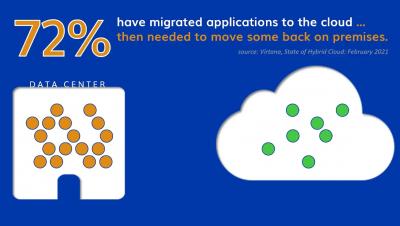
Migrating workloads to the cloud can be tricky. In fact, a study Virtana conducted earlier this year found that 72% of respondents had to move applications back on-premises after migrating them to the public cloud because they ran into a variety of problems. Clearly, organizations need to address these showstoppers.
How can you run a fully managed Kubernetes in a private cloud at half the cost of Amazon EKS (Elastic Kubernetes Service)?
Migrating your organization’s applications to the cloud is no small task. Before planning and execution can even be fathomed, many of our customers’ first challenge is to create a data-driven business case for management buy-in.
Inevitably, in the lifetime of a service or application, developers, DevOps, and SREs will need to investigate the cause of latency. Usually you will start by determining whether it is the application or the underlying infrastructure causing the latency. You have to look for signals that indicate the performance of those resources when the issue occured.
Over the last 15-plus years, the Payment Card Industry Data Security Standard – a.k.a. PCI DSS – has endured as the bellwether of IT security standards. For today’s e-commerce vendors and cloud centric retailers, maintaining alignment with “PCI” remains as relevant as ever, especially given the continued proliferation of threats and diversity of cloud and hybrid environments.
As the world becomes increasingly digital-first, it’s more important than ever for organizations to keep services always-on, innovate quickly, and deliver great customer experiences. Uptime is money, so it’s no surprise that many have made the shift to cloud in recent years in order to make use of its flexibility and scale—while controlling costs. And while 2020 wasn’t easy for any organization, those that are thriving have embraced the digital mindset.
Handling large images has always been a pain in my side since I started writing code. Lately, it has started to have a huge impact on page speed and SEO ranking. If your website has poorly optimized images it won’t score well on Google Lighthouse. If it doesn’t score well, it won’t be on the first page of Google. That sucks.
Back in 2019, I introduced you to Skeddly Projects . Projects is a feature in Skeddly that allows you to separate actions, credentials, managed backup plans, and managed start/stop plans. Almost like a mini Skeddly account within an account. Over the last few months, Skeddly’s Projects feature has been significantly enhanced. And I’m going to tell you all about the wonderful new features within Skeddly Projects.
When you are experiencing an issue with your application or service, having deep visibility into both the infrastructure and the software powering your apps and services is critical. Most monitoring services provide insights at the Virtual Machine (VM) level, but few go further. To get a full picture of the state of your application or service, you need to know what processes are running on your infrastructure.
We are excited to announce support for Google Compute Engine (GCE) N2 general purpose virtual machine (VM) types, and additional hardware configuration options powered by N2 custom machine types. N2 VMs leverage Intel 2nd Generation Xeon Scalable processors and provide a balance of compute, memory, and storage. N2 machine types also offer more than a 20% improvement in price-performance over the first-generation N1 machines.
Function as a service (FaaS) offerings like AWS Lambda are a blessing for software development. They remove many of the issues that come with the setup and maintenance of backend infrastructure. With much of the upfront work taken out of the process, they also lower the barrier to start a new service and encourage modularization and encapsulation of software systems. Testing distributed systems and serverless cloud infrastructures.
AWS offers a Compute Optimizer tool that uses machine learning to analyze your historical utilization metrics and then recommend optimal AWS resources to help you reduce costs and improve performance. And it is free, you just need to opt in to the service in the AWS Compute Optimizer Console. Sounds great, right? Well, yes and no. It is a useful little tool, but if you do not understand its pros and cons, you will not be as optimized as you may think. Here is a breakdown.
Have you ever wanted to check the status of your Splunk Cloud Platform deployment but can't easily access your laptop? We've got you covered— the Cloud Monitoring Console is now available on Spunk Mobile.
Cloud computing has conquered our lives, from massive on-premise systems and storage hubs to fully virtualized storage platforms. Today, organizations are reengineering their strategies rapidly into cloud-friendly which resulted in a rapid growth in cloud migration rate. Studies says, worldwide cloud infrastructure services investments are increased to $41.8 billion in the first quarter of 2021. Because, there is always a double-fold benefit from the cloud transformation.
Keeping the experience of your end user in mind is important when developing applications. Observability tools help your team measure important performance indicators that are important to your users, like uptime. It’s generally a good practice to measure your service internally via metrics and logs which can give you indications of uptime, but an external signal is very useful as well, wherever feasible.
Troubleshooting production issues with virtual machines (VMs) can be complex and often requires correlating multiple data points and signals across infrastructure and application metrics, as well as raw logs. When your end users are experiencing latency, downtime, or errors, switching between different tools and UIs to perform a root cause analysis can slow your developers down.
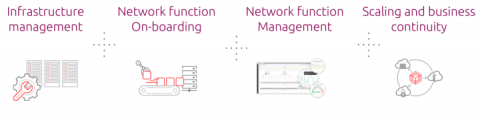
The use of NFV migration is becoming commonplace, it is made apparent there is a need for a higher degree of software management, smoother upgrades, and deployment process. Due to the complexity of the migration, Telcos have been deterred from adoption. A solution should be out there to aid businesses in managing and deploying network automation, orchestration, and managed services. In general, a telco network is complex and needs to be managed using multiple perspectives.
Here’s everything you need to know to get started with Dashbird – the complete solution for End-to-End Infrastructure observability , Real-time Error Tracking, and Well-Architected Insights. When working with AWS, One cannot emphasize enough the architectural best practices for designing workloads. One of those best practices is to design the solution in such a way that the monitoring of infrastructure and troubleshooting of errors and problems is achieved effortlessly.
When you’re troubleshooting an application on Google Kubernetes Engine (GKE), the more context that you have on the issue, the faster you can resolve it. For example, did the pod exceed it’s memory allocation? Was there a permissions error reserving the storage volume? Did a rogue regex in the app pin the CPU? All of these questions require developers and operators to build a lot of troubleshooting context.
Logs are an essential part of troubleshooting applications and services. However, ensuring your developers, DevOps, ITOps, and SRE teams have access to the logs they need, while accounting for operational tasks such as scaling up, access control, updates, and keeping your data compliant, can be challenging. To help you offload these operational tasks associated with running your own logging stack, we offer Cloud Logging.
Amazon Elastic File System (EFS) provides shared, persistent, and elastic storage in the AWS cloud. Like Amazon S3, EFS is a highly available managed service that scales with your storage needs, and it also enables you to mount a file system to an EC2 instance, similar to Amazon Elastic Block Store (EBS).
In Part 1 of this series, we looked at EFS metrics from several different categories—storage, latency, I/O, throughput, and client connections. In this post, we’ll show you how you can collect those metrics—as well as EFS logs—using built-in and external tools.
In Part 1 of this series, we looked at the key EFS metrics you should monitor, and in Part 2 we showed you how you can use tools from AWS and Linux to collect and alert on EFS metrics and logs. Monitoring EFS in isolation, however, can lead to visibility gaps as you try to understand the full context of your application’s health and performance.
Last year’s IDC’s Cloud Security Survey found that nearly 80 percent of companies polled have suffered at least one cloud data breach in the past 18 months.
As a startup, we always want to focus on the most important thing — to deliver value to our customers. For that reason, we are a huge fan of the serverless options provided by AWS (Lambda) and GCP (Cloud Function) as these allow us to maintain and quickly deploy bite-size business logic to production, without having to worry too much about maintaining the underlying servers and computing resources.
The COVID-19 pandemic has not only had a profound impact on everyone across the globe; it has also fundamentally changed the way organizations function. We are nearing one and a half years since remote work became the norm and organizations had to adapt to this new mode of working almost overnight. This rapid transition wouldn’t have been possible without the massive technology, workflow, and process upgrades undertaken by IT departments.
From containerized workloads to microservice architectures, developers are rapidly adopting new technology to scale their products at unprecedented rates. To manage these complex deployments, many teams are increasingly moving their applications to third party–managed services and infrastructure, trading full-stack visibility for simplified operations.
When you migrate workloads from on-premise infrastructure into a public cloud, you can improve the performance, reliability, and security of your application, and you might also lower your costs.
Visualizing trends in your logs is critical when troubleshooting an issue with your application. Using the histogram in Logs Explorer, you can quickly visualize log volumes over time to help spot anomalies, detect when errors started and see a breakdown of log volumes. But static visualizations are not as helpful as having more options for customization during your investigations.
If there’s one thing we learned from the 80+ sessions from Summit 2021, it’s that across the industries, companies are continuing to accelerate innovation in a bid to meet growing customer expectations of always-on services across all channels. In financial services, disrupting traditional banking or rethinking access to advisory services comes with operational and regulatory challenges.
Elastic received honors from two key partners, Microsoft and Google — a recognition of our efforts to ensure that customers can easily find and use Elastic products in the environments that best suit their needs. Elastic was named the 2021 Microsoft US Partner Award Winner in Business Excellence in the Commercial Marketplace. In addition, for the second year in a row, Elastic was selected by Google Cloud as the 2020 Technology Partner of the Year for Data Management.
The word "forecast" typically brings to mind weather predictions that have evolved through sources like snippets on television, newspaper columns, or the very popular, "Alexa, what's today's weather?" However, a financial forecast is something very different.
The ASP.NET Core framework enables you to build and deploy .NET applications on a wide variety of platforms, each of which has different observability concerns. In a previous post, we looked at monitoring a containerized ASP.NET Core application. In this guide, we’ll show how Datadog provides visibility into ASP.NET Core applications running on AWS Fargate. We’ll walk through.
In the daily life of a Site Reliability Engineer, the main goal is to reduce all the work we call toil. But what is toil? Toil is the kind of work tied to running a production service that tends to be manual, repetitive, automatable, tactical, devoid of enduring value, and scales linearly as a service grows. This blog post describes our journey to automate our nodes rotation process when we have a new AMI release and the open source tools we built on this.
AWS Simple Storage Service (S3) is by far the most popular service on AWS. The simplicity and scalability of S3 made it a go-to platform not only for storing objects, but also to host them as static websites, serve ML models, provide backup functionality, and so much more. It became the simplest solution for event-driven processing of images, video, and audio files, and even matured to a de-facto replacement of Hadoop for big data processing.
In our rapidly changing world, product manufacturing organizations are increasingly searching for ways to improve their efficiency in delivering outstanding throughputs. Digital Twins is becoming an ideal technology solution for manufacturers and process engineers that helps companies to monitor operations in real-time, control and even enable machines to learn, improve and heal themselves.